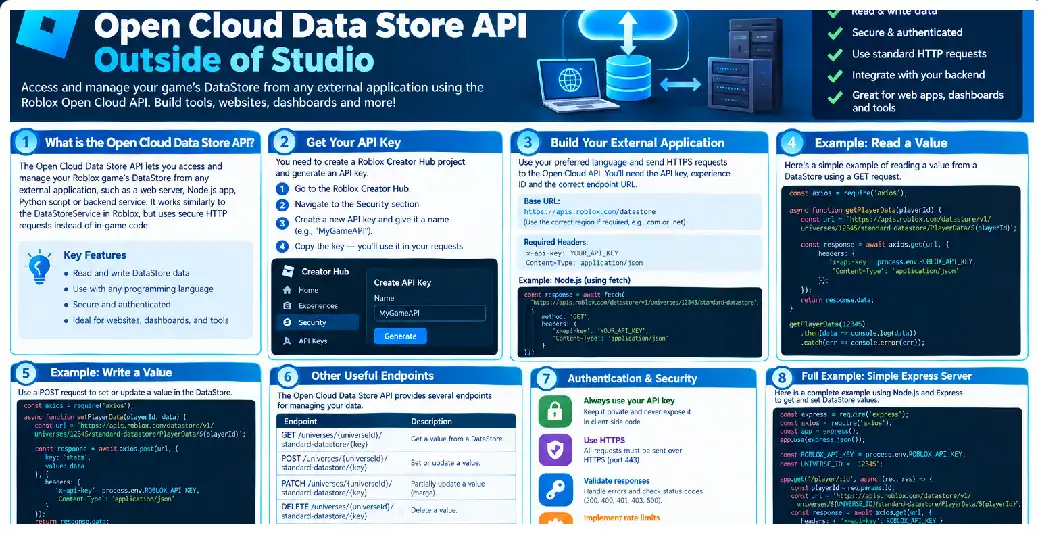
Roblox Open Cloud makes it possible to interact with persistent experience data from applications that are not running inside Roblox Studio or a live Roblox server. Instead of placing every administrative or automation feature into Luau code, developers can create external services that communicate with Roblox through authenticated HTTPS requests. This makes the technology particularly useful for dashboards, support systems, migration utilities, analytics pipelines, external websites, and developer tooling.
The central idea is simple: Roblox continues to own and manage the persistent data store, while your external application becomes an authorized client of the data. The external program does not obtain direct database access. It uses documented Open Cloud endpoints to perform supported operations against the target universe and data store.
This distinction is important when designing architecture. Your Python script, Node.js backend, desktop administration tool, or cloud service is not replacing DataStoreService. Instead, it is using a separate interface that can reach the same underlying data from outside the Roblox runtime.
Understanding the Architecture
Consider a typical Roblox game with player data:
Player
   |
   v
Roblox Server
   |
   v
Data Store
Inside the experience, DataStoreService manages access to persistent data. With Open Cloud, the architecture can become:
Administrator
      |
      v
External Dashboard
      |
      v
Backend Server
      |
      | HTTPS + API authentication
      v
Open Cloud
      |
      v
Roblox Data Store
The second architecture is powerful because the dashboard does not have to run inside Roblox. Your backend can be built using normal web-development technologies and can implement its own authentication, authorization, logging, validation, workflows, and user interface. Open Cloud is explicitly designed for external scripts and tools, and its documentation provides external Node.js and Python examples.
Standard and Ordered Data Stores
Before writing code, determine what kind of persistent data you need to access. Open Cloud supports standard data stores and ordered data stores. The current storage API provides separate endpoint families for these resources.
Standard data stores are commonly used for structured player profiles, settings, inventory data, progression, currencies, and other persistent objects. Ordered data stores are designed around ordered numeric values and are useful for ranking-oriented workloads such as leaderboards.
For a player profile, a standard record might conceptually look like:
{
  "version": 3,
  "coins": 2500,
  "level": 42,
  "inventory": [
    "Sword",
    "Shield"
  ]
}
An ordered data store, by contrast, can represent ranking values that need to be sorted for leaderboard presentation.
The Current API Structure
The current stable storage endpoints are organized around the universe and data-store hierarchy. Examples include listing data stores, listing entries, retrieving a specific entry, creating an entry, updating an entry, incrementing an entry, deleting an entry, and listing entry revisions.
A simplified URL pattern is:
https://apis.roblox.com/cloud/v2/universes/{universe_id}/...
The universe ID is essential because an external application does not automatically execute in the context of a particular Roblox experience. The external request must explicitly identify the target universe.
Getting the Correct Universe ID
Do not confuse a universe ID with a place ID. A Roblox experience can contain multiple places, while persistent data belongs to the experience’s data-store context. Open Cloud requires the universe identifier in its data-store URLs.
For an external application, keep the universe ID in configuration:
ROBLOX_UNIVERSE_ID=123456789
Then read it in your application:
const universeId = process.env.ROBLOX_UNIVERSE_ID;

if (!universeId) {
    throw new Error("Missing ROBLOX_UNIVERSE_ID");
}
This is preferable to scattering identifiers throughout your source code because the same application can then be configured for development, staging, and production environments.
Authentication With API Keys
Open Cloud API-key authentication uses the x-api-key HTTP header. API keys can be configured with permissions that determine which resources and operations the application can access.
A basic request therefore looks like:
const response = await fetch(url, {
    headers: {
        "x-api-key": process.env.ROBLOX_API_KEY
    }
});
The API key should be considered a privileged credential. It should never be treated like a public identifier.
A public identifier can be displayed:
UNIVERSE_ID=123456789
A secret credential should not:
ROBLOX_API_KEY=private-secret
Your application should store the latter through environment configuration or a secure secret-management mechanism.
API-Key Permissions
Open Cloud provides granular scopes for data-store access. The current permissions distinguish actions such as listing data stores, listing entries, reading entries, creating entries, updating entries, deleting entries, and accessing revisions.
This lets you create different credentials for different applications.
For example:
Reporting API
    -> read only

Support API
    -> read + update

Migration Utility
    -> read + create + update

Destructive Maintenance Tool
    -> carefully controlled delete permission
This separation reduces the damage that can occur if one application is compromised.
Restricting Resource Access
Permissions can also support restrictions around particular universes and, for relevant data-store scopes, particular data stores. The scope system provides target types that can narrow where a credential can operate.
This is valuable when you manage multiple experiences.
Suppose you have:
Game A
Game B
Game C
A support tool intended only for Game A should not automatically have broad permissions for all three games.
The narrower the credential, the easier it becomes to reason about the security boundary.
A Minimal Python Client
Python is a practical choice for migrations and administrative scripts.
import os
import requests

UNIVERSE_ID = os.environ["ROBLOX_UNIVERSE_ID"]
API_KEY = os.environ["ROBLOX_API_KEY"]

DATA_STORE = "PlayerData"
ENTRY_ID = "123456789"

url = (
    f"https://apis.roblox.com/cloud/v2/universes/"
    f"{UNIVERSE_ID}/data-stores/{DATA_STORE}/entries/{ENTRY_ID}"
)

response = requests.get(
    url,
    headers={
        "x-api-key": API_KEY
    },
    timeout=30
)

response.raise_for_status()

print(response.json())
The important design principle is not the language. Open Cloud supports external programming languages as long as they can send the required HTTP requests.
A Minimal Node.js Client
Node.js is equally suitable:
const universeId = process.env.ROBLOX_UNIVERSE_ID;
const apiKey = process.env.ROBLOX_API_KEY;

const dataStore = "PlayerData";
const entryId = "123456789";

const url =
    `https://apis.roblox.com/cloud/v2/universes/${universeId}` +
    `/data-stores/${encodeURIComponent(dataStore)}` +
    `/entries/${encodeURIComponent(entryId)}`;

const response = await fetch(url, {
    headers: {
        "x-api-key": apiKey
    }
});

const text = await response.text();

if (!response.ok) {
    throw new Error(`${response.status}: ${text}`);
}

console.log(JSON.parse(text));
For production applications, add structured error handling, request timeouts, logging, retries where appropriate, and input validation.
Data Serialization
One of the most important differences between engine-side data stores and Open Cloud is serialization. When using the engine API, Roblox handles serialization and deserialization around data-store values. With Open Cloud, your external application is responsible for serializing and parsing the data representation.
This means your external application needs to know your game’s schema.
For example:
{
    Coins = 1000,
    Level = 10,
    Inventory = {
        "Sword",
        "Potion"
    }
}
must be represented in the format expected by the Open Cloud request.
Do not simply assume that every internal Luau data structure can be transferred unchanged.
Designing a Data Schema
A stable schema makes external administration considerably easier.
Instead of an undocumented object such as:
{
  "a": 100,
  "b": 20,
  "c": ["Sword"]
}
prefer meaningful fields:
{
  "schemaVersion": 2,
  "currency": {
    "coins": 100,
    "gems": 20
  },
  "inventory": [
    "Sword"
  ]
}
The external application can then validate that the expected fields exist before making changes.
Reading Before Writing
An external tool should normally retrieve the current record before modifying it.
GET current entry
       |
       v
Validate schema
       |
       v
Apply requested change
       |
       v
Validate new object
       |
       v
Update entry
This workflow reduces accidental overwrites caused by an incomplete understanding of the existing record.
Creating an Entry
The current Open Cloud API has a dedicated create operation for data-store entries. This is separate from the update operation.
That separation is useful for permissions. For example, an external application may be allowed to update existing records without receiving permission to create arbitrary new records.
Before creating an entry, your application should determine whether creation is actually expected. If a player ID is supposed to exist already, silently creating a replacement record may hide an underlying problem.
Updating an Entry
Updating is appropriate when the target record already exists. Your application should validate the entry ID, retrieve the current representation when appropriate, modify the required fields, and send the update request using the documented API format.
Avoid simplistic code like:
update({
    coins: 5000
});
unless you have explicitly designed the schema and update semantics to support partial updates.
A safer conceptual workflow is:
const current = await getPlayerData(playerId);

const updated = {
    ...current,
    coins: current.coins + 500
};

await updatePlayerData(playerId, updated);
The precise API request body should follow the current endpoint specification.
Increment Operations
The storage API also provides an increment operation. This is useful when the desired operation is numeric addition rather than replacement of an entire object.
Examples include:
Coins + 100
Experience + 500
Score + 25
Increment operations can reduce the need to construct a complete replacement value for a simple numeric adjustment.
However, the surrounding business logic still matters. If your game has rules preventing arbitrary currency grants, your external tool should enforce those rules before issuing the request.
Listing Entries
An administration tool often needs to discover entries rather than receiving one known key.
The API provides list-entry endpoints for data stores. Large collections should be processed with pagination. The external examples specifically use maxPageSize and pageToken for this purpose.
A generic pagination loop looks like:
let pageToken = undefined;

do {
    const url = new URL(baseUrl);

    url.searchParams.set("maxPageSize", "100");

    if (pageToken) {
        url.searchParams.set("pageToken", pageToken);
    }

    const response = await fetch(url, {
        headers: {
            "x-api-key": apiKey
        }
    });

    const page = await response.json();

    for (const entry of page.entries ?? []) {
        processEntry(entry);
    }

    pageToken = page.nextPageToken;
} while (pageToken);
The exact response field names should be confirmed against the current API schema before production deployment.
Pagination Is Essential for Migrations
Suppose a game has 500,000 records. A migration utility cannot reasonably assume that one HTTP response will contain all of them. Pagination divides the work into manageable pages.
A migration can therefore operate like:
Page 1
  -> transform
  -> validate
  -> write

Page 2
  -> transform
  -> validate
  -> write

Page 3
  -> transform
  -> validate
  -> write
Store progress externally so that the migration can resume after interruption.
Rate Limits and Shared Budgets
External access does not create unlimited data-store capacity. Roblox documents request limits for data-store operations, and relevant budgets are shared between Open Cloud and in-experience data-store usage.
This has an important architectural consequence: an external migration running aggressively during peak game activity can compete for data-store capacity with the live game.
Therefore, large maintenance jobs should be designed as controlled workloads rather than unrestricted loops.
Batching
A good migration process might use:
Read 50–100 records
        |
Transform
        |
Validate
        |
Write controlled batch
        |
Pause / monitor
        |
Next page
The exact batch size depends on the operation and rate limits. The important principle is controlled throughput rather than maximum possible request speed.
Retry Strategy
A robust client should not treat every failed request identically.
For example:
Authentication failure
    -> stop

Permission failure
    -> stop

Invalid request
    -> fix input

Rate-limited request
    -> wait and retry carefully

Temporary service/network failure
    -> bounded retry

Success
    -> continue
Retries should have a maximum count and backoff. Otherwise, a service problem can cause your application to generate even more traffic and make the situation worse.
Migration Safety
Large migrations are where external Data Store access becomes particularly powerful and particularly dangerous.
Before modifying production data:
- Test the transformation on sample records.
- Validate the new schema.
- Implement dry-run mode.
- Log every transformation result.
- Create checkpoints.
- Process small batches.
- Monitor failures.
- Make the process resumable.
A migration should never depend on one giant script execution that must finish perfectly from beginning to end.
Dry-Run Mode
A dry-run migration might output:
Player: 123
Old Level: 20
New Level: 21
Old Coins: 1000
New Coins: 1100
ACTION: WOULD UPDATE
Only after the developer verifies the transformation should the application switch to:
ACTION: UPDATE
This simple feature can prevent enormous data mistakes.
Revisions
The current Open Cloud API provides an endpoint for listing data-store entry revisions. This makes revision history useful when investigating how a particular record has changed.
A support application can expose:
Current Version
Previous Version
Revision Timestamp
Version Identifier
This can make troubleshooting much easier than maintaining a separate manual record of every change.
External Support Tools
A strong use case is an internal support panel.
Imagine an administrator receives a ticket:
Player says their inventory disappeared.
The support panel could:
Enter Player ID
      |
      v
Fetch profile
      |
      v
Display inventory
      |
      v
Display relevant revision history
      |
      v
Perform authorized correction
      |
      v
Record support action
The support tool itself should not allow arbitrary destructive operations to every employee. Build role-based permissions into your backend.
Audit Logging
The Roblox API tells your application whether an operation succeeded, but your own application should also maintain appropriate operational logs.
For example:
{
  "operator": "support-user-17",
  "player": "123456789",
  "action": "grant_currency",
  "amount": 500,
  "timestamp": "2026-09-21T10:30:00Z",
  "result": "success"
}
This gives your team a record of administrative activity.
Never Trust Client Input
Suppose a browser sends:
{
  "playerId": "123",
  "coins": 999999999
}
Your backend should not blindly pass that request to Open Cloud.
Instead:
Browser request
      |
      v
Authenticate operator
      |
      v
Authorize action
      |
      v
Validate player ID
      |
      v
Validate amount
      |
      v
Apply game rules
      |
      v
Open Cloud request
Open Cloud permissions protect the Roblox resource, while your backend’s authorization protects the business operation.
API Keys Versus OAuth
API keys are convenient for private tooling, while OAuth 2.0 is designed for authorization flows where an application can obtain permission to access resources without requiring the user to give the application their Roblox credentials. The current OAuth documentation identifies the feature as beta, while Open Cloud endpoints also support API-key authentication.
If you are building a private tool for your own experience, a restricted API key may be simpler. If you are building a service that many creators authorize to access their own experiences, OAuth deserves consideration.
When Open Cloud Is Not the Right Tool
Open Cloud should not automatically become the solution for every data operation.
If game servers need frequent, low-latency access to player data while the game is running, DataStoreService remains the engine-side interface designed for that environment. Open Cloud is particularly valuable when an external process needs controlled access.
Similarly, temporary high-frequency cross-server coordination is a different problem from persistent data storage. The platform provides memory stores for temporary data that needs frequent updates or access.
Designing a Production Client
A reusable client library might expose methods like:
class RobloxDataStoreClient {
    constructor({ universeId, apiKey }) {
        this.universeId = universeId;
        this.apiKey = apiKey;
    }

    async getEntry(dataStore, entry) {
        // GET implementation
    }

    async listEntries(dataStore, options = {}) {
        // Pagination implementation
    }

    async createEntry(dataStore, entry, value) {
        // POST implementation
    }

    async updateEntry(dataStore, entry, value) {
        // PATCH implementation
    }

    async incrementEntry(dataStore, entry, amount) {
        // Increment implementation
    }

    async deleteEntry(dataStore, entry) {
        // DELETE implementation
    }
}
This separates Roblox API communication from your business logic.
Your support application can then say:
const profile = await client.getEntry(
    "PlayerData",
    playerId
);
instead of repeating URL construction and authentication code throughout the application.
Error Handling
Centralize error handling.
For example:
async function request(url, options) {
    const response = await fetch(url, options);
    const body = await response.text();

    if (!response.ok) {
        throw new Error(
            `Open Cloud request failed: ${response.status} ${body}`
        );
    }

    return body ? JSON.parse(body) : null;
}
In a production system, expand this with structured error categories, retry rules, logging, correlation IDs, and safe redaction of credentials.
Protecting Secrets
A secret should never appear in:
HTML
JavaScript delivered to browsers
Git repositories
Screenshots
Public logs
Client-side Roblox scripts
Public configuration files
Environment variables are a simple starting point:
ROBLOX_API_KEY=...
ROBLOX_UNIVERSE_ID=...
Production infrastructure may provide a dedicated secret-management system as well.
UK, USA, and Canada
The Open Cloud API itself is not region-specific in the sense that developers in the UK, United States, or Canada need different endpoint formats or different Data Store programming models. The platform API is the same.
Organizations should nevertheless design their external applications according to their own security, privacy, retention, access-control, and compliance requirements. These are application-governance questions and should not be assumed to be automatically solved by an API credential.
Production Checklist
Before launch, verify:
[ ] Universe ID verified
[ ] Data-store names verified
[ ] API key created
[ ] Least-privilege scopes configured
[ ] Resource restrictions reviewed
[ ] API key stored server-side
[ ] Browser cannot access API key
[ ] Authentication implemented
[ ] Authorization implemented
[ ] Input validation implemented
[ ] Pagination implemented
[ ] Rate limits considered
[ ] Retry policy implemented
[ ] Dry-run mode available
[ ] Migration checkpointing implemented
[ ] Error logging implemented
[ ] Audit logging implemented
[ ] Production testing completed
Frequently Asked Questions
Can Open Cloud access Data Stores outside Roblox Studio?
Yes. Open Cloud Data Store APIs are specifically designed to allow external scripts and tools to access standard and ordered data stores.
What programming languages can I use?
Any language capable of sending HTTP requests can potentially communicate with the APIs. Official examples demonstrate both JavaScript and Python.
Do I need DataStoreService in my external application?
No. Your external application communicates through Open Cloud rather than using the engine-side DataStoreService API.
Do I need the universe ID?
Yes. External Open Cloud requests must identify the universe because the request is not automatically associated with a running Roblox experience.
Where should the API key be stored?
Store it on trusted server-side infrastructure, preferably through environment configuration or a secure secret-management system. Do not expose it to browsers or players.
Can Open Cloud update a player’s inventory?
Yes, assuming the application has appropriate permissions and your external application understands the data schema. The current API provides update operations for data-store entries.
Can I create a new player record?
The current API provides a separate create-entry operation. Whether your application should create the record is a business rule that should be explicitly controlled.
Can I delete player data?
The API provides entry deletion, but deletion should be protected by strict authorization and operational controls because it is destructive.
Can I build a web dashboard?
Yes. A backend can communicate with Open Cloud while the browser communicates only with your backend.
Can I migrate data from one schema to another?
Yes. External schema migration is a documented use case.
Are Open Cloud requests unlimited?
No. Data-store operations have documented request limits, and Open Cloud traffic shares relevant budgets with game-server data-store usage.
Can I see old versions of an entry?
The API provides entry-revision functionality that can be used to inspect revisions.
Is Open Cloud suitable for live-game requests?
It can be used for external workflows, but normal in-game persistence should generally use the engine-side data-store interface. Open Cloud is most valuable when the caller is an external application or service.
Conclusion
Using Open Cloud Data Stores outside Studio fundamentally changes what you can build around a Roblox experience. Instead of treating persistent player data as something that can only be accessed by game servers, you can create carefully controlled external systems for administration, support, migration, reporting, leaderboards, and automation.
The most important lesson is that external data access should be treated as backend engineering rather than simply sending HTTP requests. Secure the API key, restrict permissions, validate all inputs, understand your data schema, implement pagination, respect shared request budgets, handle failures, and build recovery mechanisms before touching production data.