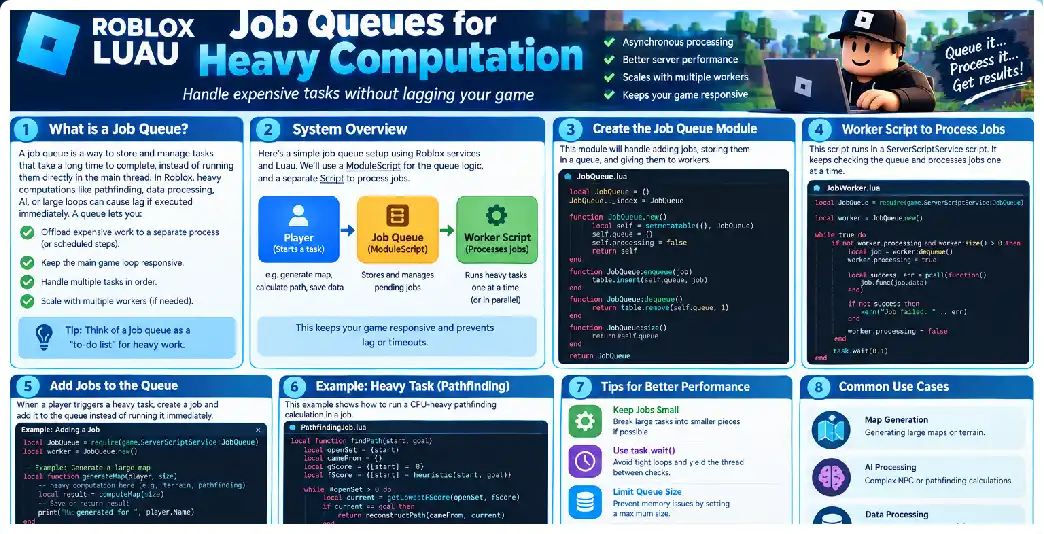
Heavy server-side computation is one of the most common causes of performance problems in complex Roblox experiences. As an experience grows, scripts may need to process procedural generation, NPC calculations, pathfinding-related work, raycast validation, inventory operations, simulation logic, analytics, terrain processing, AI decisions, large datasets, or other CPU-intensive tasks.
The problem is not always that the computation itself is impossible for Roblox to perform. The bigger problem is when and how the computation is performed.
If a server attempts to execute hundreds or thousands of expensive operations in a single execution cycle, the workload can compete with gameplay systems that need to respond quickly. Players may experience delayed input, stuttering, delayed NPC behavior, slow UI responses, or other symptoms of server-side workload pressure.
A job queue provides a structured way to solve this problem.
Instead of performing every expensive operation immediately, the server creates a job, places that job into a queue, and allows one or more workers to process jobs according to a controlled schedule.
This approach creates a separation between:
- Producing work
- Storing pending work
- Scheduling work
- Processing work
- Handling failures
- Retrying failed jobs
- Controlling concurrency
- Reporting results
- Cleaning up completed jobs
For large Roblox experiences, this separation can make heavy workloads significantly easier to manage.
What Is a Job Queue?
A job queue is a system where tasks waiting to be processed are stored in an ordered collection.
Imagine that 500 players trigger an operation at approximately the same time.
Without a queue, the server might attempt to process all 500 operations immediately.
With a queue, the system could instead accept all 500 requests and process them gradually.
For example:
Players
   |
   v
Create Jobs
   |
   v
+----------------------+
|      JOB QUEUE       |
|----------------------|
| Job 001              |
| Job 002              |
| Job 003              |
| Job 004              |
| Job 005              |
| ...                  |
+----------------------+
   |
   v
Workers
   |
   +---- Worker 1
   +---- Worker 2
   +---- Worker 3
   +---- Worker 4
   |
   v
Completed Results
The important concept is that requesting work does not necessarily mean executing the work immediately.
The producer creates a job.
The queue holds the job.
A worker eventually retrieves it.
The worker performs the computation.
The worker records the result.
This architecture is particularly useful when jobs are expensive but do not have to execute during the exact instant that the request arrives.
Why Heavy Computation Can Hurt Roblox Servers
Roblox servers continuously perform many different responsibilities.
A typical experience may simultaneously handle:
- Player movement
- Character replication
- Physics
- NPC logic
- RemoteEvent processing
- RemoteFunction requests
- Animation-related logic
- Combat systems
- Inventory systems
- Data processing
- UI-related server requests
- Matchmaking
- Game rules
- Procedural systems
- AI calculations
Adding a large amount of computation on top of these responsibilities can increase server workload.
Consider this simplified example:
for _, player in Players:GetPlayers() do
    performVeryExpensiveCalculation(player)
end
The problem becomes much larger when performVeryExpensiveCalculation() itself contains thousands or millions of operations.
A better architecture can break the workload into smaller jobs.
for _, player in Players:GetPlayers() do
    Queue:Add({
        playerId = player.UserId,
        jobType = "CalculateStats"
    })
end
Workers can then process jobs according to a controlled workload.
The objective is not necessarily to make each individual computation faster.
The objective is to prevent one large burst of computation from overwhelming the server.
The Three Main Types of Queue Architecture
There are three common architectures you can consider when designing a Roblox job queue.
1. Local In-Memory Queue
A local queue exists inside one server.
Server
 |
 +-- Queue
 |
 +-- Worker
 |
 +-- Worker
 |
 +-- Worker
This is appropriate when the jobs only need to exist inside the current server.
It is usually the simplest and fastest option.
A local queue can be implemented using a Luau table.
local jobQueue = {}

local function enqueue(job)
    table.insert(jobQueue, job)
end

local function dequeue()
    if #jobQueue == 0 then
        return nil
    end

    return table.remove(jobQueue, 1)
end
However, this simple implementation is not ideal for every workload.
Removing the first item from a large array can require shifting the remaining entries. For a production queue, a head/tail indexing system is generally more efficient.
local Queue = {}
Queue.__index = Queue

function Queue.new()
    return setmetatable({
        items = {},
        head = 1,
        tail = 0
    }, Queue)
end

function Queue:Push(item)
    self.tail += 1
    self.items[self.tail] = item
end

function Queue:Pop()
    if self.head > self.tail then
        return nil
    end

    local item = self.items[self.head]
    self.items[self.head] = nil
    self.head += 1

    return item
end

function Queue:IsEmpty()
    return self.head > self.tail
end

return Queue
This design avoids repeatedly shifting every element.
2. Cross-Server Queue
A local queue only exists inside one server.
If your experience has dozens or hundreds of active servers, you may need a queue shared between servers.
This is where Roblox’s memory-based cross-server infrastructure becomes useful.
A MemoryStore queue can provide a queue accessible to different servers belonging to the same experience.
For example:
                 Global Queue
                     |
        +------------+------------+
        |            |            |
        v            v            v
     Server A     Server B     Server C
        |            |            |
      Worker       Worker       Worker
This architecture can distribute jobs between servers.
One server may add a job.
Another server can retrieve it.
That makes MemoryStore particularly useful for workloads that should not remain tied to a single server.
MemoryStore is intended for rapidly changing, temporary data rather than permanent player data.
Therefore, it should not automatically replace persistent data storage.
3. Hybrid Queue
For many advanced experiences, a hybrid architecture is more appropriate.
A hybrid queue uses a local queue for immediate work and a shared queue for cross-server work.
For example:
Player Request
      |
      v
Job Router
      |
      +----------------------+
      |                      |
 Local Job                Global Job
 Queue                    Queue
      |                      |
      v                      v
Local Workers          Server Workers
This approach lets you keep latency-sensitive work local while distributing larger background workloads through a shared queue.
When Should You Use a Job Queue?
A queue is useful when work can tolerate some delay.
Good examples include:
- Procedural world generation
- Large NPC calculations
- Batch calculations
- Background statistics processing
- Large-scale raycast processing
- AI decision batches
- Map analysis
- Offline-style calculations
- Data transformation
- Server maintenance tasks
- Background reward calculations
- Large inventory calculations
- Batch leaderboard calculations
- Non-urgent analytics processing
A queue is less suitable when the player requires the result immediately.
For example, if a player presses a button and expects an instantaneous response, placing the entire interaction behind a slow queue may create an unnecessarily poor experience.
In that situation, consider separating the work into:
- Immediate validation
- Fast player feedback
- Background processing
Understanding Producer and Worker Architecture
A good job queue usually has two primary components.
Producer
The producer creates jobs.
local function createJob(player)
    return {
        id = game:GetService("HttpService"):GenerateGUID(false),
        playerId = player.UserId,
        type = "HeavyCalculation",
        createdAt = os.clock()
    }
end
The producer then submits the job to the queue.
Worker
The worker retrieves jobs.
local function processJob(job)
    if job.type == "HeavyCalculation" then
        return performCalculation(job)
    end
end
The separation makes the architecture easier to maintain.
You can add additional producers without rewriting the workers.
You can also increase or decrease the number of workers without changing how jobs are created.
Designing a Job Object
A good job should contain enough information for a worker to understand what needs to happen.
A typical job might look like:
local job = {
    id = "unique-job-id",
    type = "GenerateChunk",
    playerId = 123456,
    payload = {
        chunkX = 10,
        chunkZ = 20
    },
    createdAt = os.time(),
    attempts = 0
}
The id uniquely identifies the job.
The type tells the worker which operation should be performed.
The playerId identifies the player associated with the request when applicable.
The payload contains the actual parameters.
The timestamp helps with monitoring.
The attempt count can help implement retry logic.
Avoid putting unnecessary information into shared queue items.
Smaller job payloads reduce storage and transfer overhead and make queues easier to operate at scale.
Building a Basic Local Job Queue
A simple worker can repeatedly check for jobs.
local Queue = require(script.Queue)

local queue = Queue.new()

local function processJob(job)
    print("Processing:", job.id)

    -- Heavy computation goes here.
end

task.spawn(function()
    while true do
        local job = queue:Pop()

        if job then
            local success, err = pcall(function()
                processJob(job)
            end)

            if not success then
                warn("Job failed:", job.id, err)
            end
        else
            task.wait(0.1)
        end
    end
end)
This is a basic worker.
However, it has an important limitation.
If processJob() takes a very long time, the worker remains occupied.
A production system therefore needs concurrency controls.
Controlling Worker Concurrency
Suppose you create 100 workers.
That does not automatically mean your server can safely process 100 expensive jobs simultaneously.
Too much concurrency can simply move the bottleneck somewhere else.
For example:
Too few workers
      |
      v
Huge queue
      |
      v
High job latency


Too many workers
      |
      v
CPU pressure
      |
      v
Server performance problems
The correct number depends on the workload.
A lightweight job may allow more concurrency.
A CPU-heavy job may require fewer simultaneous workers.
Start conservatively.
Measure.
Then increase concurrency gradually.
Using task.spawn and task.defer
Roblox provides scheduling mechanisms for running Luau functions through the engine’s scheduler.
For example:
task.spawn(function()
    processJob(job)
end)
This can allow a worker to start processing without blocking the surrounding code in the same way as a direct function call.
task.defer() is useful when you want to schedule work without requiring it to execute immediately at the current resume point.
For example:
task.defer(function()
    processJob(job)
end)
The distinction matters when designing a queue because you want to avoid creating an uncontrolled number of scheduled tasks.
The queue should control how much work is allowed to enter execution.
Do Not Turn the Queue Into an Unlimited task.spawn Loop
One common mistake is creating a queue and then defeating the queue’s purpose.
For example:
for _, job in jobs do
    task.spawn(function()
        processJob(job)
    end)
end
This technically schedules the work, but it does not provide meaningful backpressure.
If 10,000 jobs arrive, you could potentially schedule an enormous number of tasks.
A better architecture is:
Queue
 |
 v
Worker Pool
 |
 +-- Worker 1
 +-- Worker 2
 +-- Worker 3
 +-- Worker 4
Only a controlled number of jobs should execute simultaneously.
Implementing a Worker Pool
A worker pool can be implemented with a fixed number of workers.
local WORKER_COUNT = 4

local function worker(workerId)
    while true do
        local job = queue:Pop()

        if job then
            local success, err = pcall(function()
                processJob(job)
            end)

            if not success then
                warn(
                    "Worker",
                    workerId,
                    "failed job",
                    job.id,
                    err
                )
            end
        else
            task.wait(0.05)
        end
    end
end

for workerId = 1, WORKER_COUNT do
    task.spawn(worker, workerId)
end
This architecture creates four independent workers.
At most four jobs are actively processed through this worker pool at a time.
You can change the worker count after measuring actual server performance.
Adding Job Priorities
Not every job has equal importance.
For example:
Priority 1 = Player-critical
Priority 2 = Gameplay
Priority 3 = Background
Priority 4 = Maintenance
A priority system allows urgent work to be processed before low-priority work.
For a local queue, you can maintain multiple queues:
High Priority Queue
Medium Priority Queue
Low Priority Queue
A worker can first check the high-priority queue.
local function getNextJob()
    return highPriorityQueue:Pop()
        or mediumPriorityQueue:Pop()
        or lowPriorityQueue:Pop()
end
Be careful with priority starvation.
If high-priority work never stops arriving, low-priority work may never execute.
A production scheduler can reserve some worker capacity for lower-priority tasks.
Using MemoryStoreService for Cross-Server Jobs
When jobs must be shared across live servers, MemoryStoreService provides queue functionality designed for temporary, rapidly changing information.
A basic queue can be obtained like this:
local MemoryStoreService = game:GetService("MemoryStoreService")

local queue = MemoryStoreService:GetQueue(
    "HeavyComputationJobs",
    60
)
The second parameter represents the invisibility timeout used for read operations.
The purpose of the invisibility period is important.
When a worker reads a job, the job can temporarily become invisible to other readers.
This helps prevent multiple workers from immediately processing the same item.
Adding Jobs to a MemoryStore Queue
A producer can add a job:
local HttpService = game:GetService("HttpService")

local job = {
    id = HttpService:GenerateGUID(false),
    type = "GenerateChunk",
    chunkX = 25,
    chunkZ = 40,
    createdAt = os.time()
}

queue:AddAsync(job, 300)
The expiration value determines how long the item should remain available.
For temporary background work, avoid unnecessarily long expiration periods.
Jobs that are no longer useful should not occupy queue capacity indefinitely.
Reading Jobs
A worker can read jobs from the queue.
Conceptually:
local items = queue:ReadAsync(
    1,
    false,
    5
)
The worker receives one or more jobs depending on the requested amount.
After successfully processing a job, the worker should remove the corresponding item.
The important lifecycle is:
Add
 |
 v
Read
 |
 v
Invisible
 |
 v
Process
 |
 +---- Success ---> Remove
 |
 +---- Failure ---> Retry/expire
This model is extremely important for reliable queue processing.
Understanding the Invisibility Timeout
Suppose the worker reads a job.
The job becomes temporarily invisible.
The worker starts a calculation.
But the calculation takes longer than the invisibility period.
The job may become visible again before processing has finished.
Another worker could potentially receive it.
That can lead to duplicate processing.
Therefore, the invisibility timeout should be selected with the expected maximum processing time in mind.
For example, if a job normally takes two seconds but occasionally takes fifteen seconds, an invisibility timeout of only five seconds may be inappropriate.
However, making the timeout extremely long has another downside: if a worker crashes while processing a job, the job may remain unavailable until the timeout expires.
This is a trade-off between duplicate protection and recovery speed.
Design Jobs to Be Idempotent
One of the most important concepts in distributed job processing is idempotency.
An idempotent job can safely be processed more than once without producing an incorrect final result.
For example, suppose a job says:
Set generated chunk 25,40 to version 7.
Running it twice should produce the same final state.
Compare that with:
Give player 100 coins.
If the job runs twice, the player could receive 200 coins.
That is dangerous.
Instead, use a unique transaction identifier:
local transactionId = job.id
Then track whether that transaction has already been completed.
Conceptually:
Job ID
   |
   v
Has this job already completed?
   |
   +---- YES ---> Do not repeat side effect
   |
   +---- NO ----> Process
                    |
                    v
                 Record completion
Idempotency becomes particularly important when jobs interact with player data, currencies, inventories, purchases, or other persistent systems.
Separate Computation From Side Effects
A powerful design technique is to separate pure computation from external side effects.
For example:
local result = calculateReward(input)
is different from:
player.leaderstats.Coins.Value += result
The first operation calculates something.
The second changes game state.
Try to keep the expensive computation separate from the state-changing operation.
For example:
local function calculate(input)
    -- Heavy calculation
    return result
end

local function applyResult(player, result)
    -- State changes
end
This makes retries much safer.
Handling Failed Jobs
Jobs will sometimes fail.
Possible causes include:
- Invalid input
- Player leaving
- Missing Instance
- Temporary service failure
- Unexpected data
- Script errors
- Timeout
- Server shutdown
- Resource limits
Never assume that every job will succeed.
Use protected execution:
local success, result = pcall(function()
    return processJob(job)
end)

if not success then
    warn("Job failed:", result)
end
You can then decide whether the job should be retried.
Implementing Retry Logic
A simple retry policy might look like:
Attempt 1
   |
 Failure
   |
 Wait
   |
Attempt 2
   |
 Failure
   |
 Wait longer
   |
Attempt 3
   |
 Failure
   |
Dead-letter handling
Avoid retrying continuously without a delay.
Repeatedly retrying an unavailable operation can make the underlying problem worse.
Exponential backoff is often more appropriate.
For example:
local function getRetryDelay(attempt)
    return math.min(2 ^ attempt, 60)
end
The delays could become approximately:
2 seconds
4 seconds
8 seconds
16 seconds
32 seconds
60 seconds
A small random component can also help prevent many workers from retrying at exactly the same time.
Maximum Retry Attempts
A job should generally have a retry limit.
For example:
local MAX_ATTEMPTS = 5
Then:
job.attempts = (job.attempts or 0) + 1

if job.attempts > MAX_ATTEMPTS then
    -- Send to failure handling
end
Without a retry limit, permanently invalid jobs can remain in a retry cycle indefinitely.
Creating a Dead-Letter Queue
A dead-letter queue stores jobs that could not be successfully processed after repeated attempts.
Main Queue
    |
    v
Worker
    |
    +---- Success ---> Completed
    |
    +---- Failure ---> Retry
                         |
                         v
                    Max Attempts?
                         |
                    YES  v
                    Dead Letter
A dead-letter system is extremely useful when debugging production problems.
Instead of silently losing failed jobs, you preserve enough information to investigate them.
A dead-letter item could contain:
{
    id = job.id,
    type = job.type,
    attempts = job.attempts,
    error = tostring(errorMessage),
    failedAt = os.time()
}
Do not store sensitive or unnecessary player information.
Preventing Duplicate Jobs
Another common problem is duplicate job creation.
Suppose the player presses a button several times.
The server could accidentally create:
Job A
Job A
Job A
Job A
when only one operation was required.
One solution is to generate a deterministic job key.
For example:
PlayerID + OperationType + ObjectID
You can then maintain a record indicating whether an equivalent operation is already queued or processing.
For temporary coordination across servers, a shared memory structure can help.
Using MemoryStore Hash Maps for Job State
A queue is excellent for ordering jobs.
A hash map is useful for looking up state by key.
For example:
Job Queue
    |
    +--> Job A
    +--> Job B
    +--> Job C

Job State Map
    |
    +--> A = processing
    +--> B = completed
    +--> C = failed
This separation is useful because the queue answers:
What should I process next?
The hash map answers:
What is the current state of this job?
Job State Machines
For larger systems, define explicit job states.
For example:
QUEUED
  |
  v
PROCESSING
  |
  +----> COMPLETED
  |
  +----> FAILED
              |
              v
            RETRY
              |
              v
          PROCESSING
Possible states include:
queuedprocessingcompletedretryingfailedcancelled
Explicit states make debugging much easier.
Handling Player Disconnects
Consider a job created by a player.
The player leaves while the job is being processed.
Should the job continue?
That depends on what the job does.
If the job calculates a global world state, it may need to continue.
If the job only updates temporary UI information, it may be safe to cancel it.
Never assume that the player still exists.
Instead:
local Players = game:GetService("Players")

local player = Players:GetPlayerByUserId(job.playerId)

if not player then
    -- Decide whether the job can continue without the player.
end
This distinction is important for reliable background processing.
Breaking Large Jobs Into Smaller Jobs
Suppose you need to process 100,000 objects.
Do not necessarily create one enormous job.
Instead:
100,000 objects
      |
      v
10,000 objects
      |
      +-- Job 1
      +-- Job 2
      +-- Job 3
      +-- Job 4
      +-- ...
Smaller jobs provide several advantages.
They:
- Reduce individual execution time
- Improve recovery
- Allow more flexible scheduling
- Make retries cheaper
- Improve workload distribution
- Reduce the impact of one failed operation
This is especially useful for procedural generation.
Chunking Procedural Generation
Imagine generating a large world.
Instead of:
generateEntireWorld()
create jobs:
generateChunk(0, 0)
generateChunk(0, 1)
generateChunk(1, 0)
generateChunk(1, 1)
A queue can process chunks independently.
{
    type = "WorldChunk",
    x = 0,
    z = 0
}
A worker retrieves the job and generates that chunk.
This architecture also makes it easier to distribute work between servers.
Combining Job Queues With Parallel Luau
For some workloads, queueing and parallel execution can complement each other.
The queue controls when work is accepted.
Parallel Luau can help control how certain computation is distributed across execution contexts.
These solve different problems.
For example:
Global Job Queue
       |
       v
Server Worker Pool
       |
       v
Parallelizable Computation
       |
       v
Result
Parallel Luau is particularly relevant for workloads where computations can safely run independently.
Potential examples include:
- NPC calculations
- Raycasting-related workloads
- Procedural generation
- Independent simulation calculations
However, not every Roblox API or data operation can simply be moved into parallel execution.
Code must follow the safety and synchronization requirements of the parallel execution model.
Avoiding Shared Mutable State
Heavy parallel computation becomes more difficult when many workers modify the same data.
For example:
sharedCounter += 1
If many workers depend on the same mutable state, synchronization becomes complicated.
Prefer designs where workers operate on independent input.
For example:
Worker 1 -> Chunk A
Worker 2 -> Chunk B
Worker 3 -> Chunk C
Worker 4 -> Chunk D
Then combine the results afterward.
This reduces contention and makes the system easier to reason about.
Backpressure: The Most Important Queue Concept
Backpressure means slowing producers down when workers cannot keep up.
Suppose:
Producer = 1,000 jobs/sec
Workers = 100 jobs/sec
The queue grows continuously.
Eventually, the queue becomes a problem itself.
A good system monitors queue growth.
Queue Size
   |
   +---- Normal
   |
   +---- Elevated
   |
   +---- High
   |
   +---- Critical
When the queue becomes too large, you may need to:
- Reject low-priority jobs
- Combine duplicate jobs
- Reduce job frequency
- Increase worker capacity where appropriate
- Process jobs in batches
- Reduce computation complexity
- Move suitable work to another system
Simply allowing the queue to grow forever is not a solution.
Batch Processing
Some jobs can be processed in batches.
Instead of:
Job 1
Job 2
Job 3
Job 4
you can retrieve:
Batch:
Job 1
Job 2
Job 3
Job 4
Job 5
Then process them together.
Batching can reduce overhead and can be especially useful when several jobs perform similar operations.
For example, instead of repeatedly initializing the same calculation environment, initialize it once and process multiple records.
However, excessively large batches can recreate the original performance problem.
The batch size should therefore be measured rather than chosen arbitrarily.
Queue Sharding
At sufficiently large scale, a single queue can become a bottleneck.
One solution is sharding.
Instead of:
One Queue
use:
Queue 1
Queue 2
Queue 3
Queue 4
Jobs are distributed among them.
For example:
local shard = (job.playerId % 4) + 1
local queueName = "Jobs_" .. shard
This creates four logical queues.
Sharding can distribute request load and reduce pressure on a single data structure.
However, sharding makes queue management more complicated.
You need to decide:
- How jobs are assigned
- How workers discover queues
- How priority works
- How jobs are balanced
- How shutdown works
- How monitoring aggregates results
Do not introduce sharding simply because it sounds scalable.
Use it when measurements indicate that the existing architecture needs it.
Queue Expiration and Cleanup
Temporary queues should not retain stale jobs forever.
Imagine a job that becomes irrelevant after five minutes.
There is little reason to retain it for hours.
Shorter expiration periods can help prevent stale data from accumulating.
For example:
queue:AddAsync(job, 300)
means the job has a limited lifetime.
The appropriate expiration time depends on the application’s requirements.
A world-generation job might remain useful longer than a temporary UI calculation.
MemoryStore Quotas Matter
MemoryStore is not an unlimited database.
Your architecture must account for:
- Request limits
- Data structure limits
- Item sizes
- Expiration
- Read frequency
- Write frequency
- Queue throughput
A system that works with 10 players may behave very differently with thousands of concurrent users.
Therefore, queue design should consider the experience’s expected scale.
Do not repeatedly poll the queue at extremely high frequency when there is no work.
Avoiding Aggressive Polling
This pattern is inefficient:
while true do
    checkQueue()

    task.wait()
end
Especially if the queue is empty.
A better approach uses a modest polling interval or an appropriate waiting strategy.
For example:
while true do
    local jobs = readJobs()

    if #jobs == 0 then
        task.wait(0.25)
    end
end
The correct interval depends on how quickly jobs need to be processed.
A background job system may tolerate hundreds of milliseconds of waiting.
A player-facing operation may require substantially lower latency.
Monitoring Queue Health
A production queue should expose useful metrics.
At minimum, consider tracking:
- Queue length
- Jobs completed
- Jobs failed
- Jobs retried
- Average processing time
- Maximum processing time
- Jobs per second
- Worker utilization
- Age of oldest job
- Number of abandoned jobs
For example:
Queue Length:       42
Workers:             6
Active Jobs:         6
Completed/min:     350
Failed/min:           2
Average Duration:  0.18 sec
Oldest Job:        1.7 sec
These numbers make performance problems much easier to diagnose.
Measuring Job Duration
Record when a job begins and ends.
local started = os.clock()

local success, result = pcall(function()
    return processJob(job)
end)

local duration = os.clock() - started

print("Job duration:", duration)
This allows you to identify unusually expensive jobs.
You may discover that:
90% of jobs = 0.02 seconds
9% = 0.1 seconds
1% = 5 seconds
That final 1% may be responsible for a disproportionate amount of server pressure.
Add Job Timeouts
Some computations can accidentally run far longer than expected.
A production system should consider maximum processing duration.
Conceptually:
Expected duration: 0.5 seconds
Warning:           2 seconds
Critical:          10 seconds
If jobs regularly exceed the expected duration, investigate the algorithm instead of simply increasing the timeout.
Long-running jobs can reduce worker availability and increase queue latency.
Avoid Yielding Inside Tight Computation Loops Without a Reason
A huge loop such as:
for i = 1, 10000000 do
    expensiveOperation(i)
end
can monopolize execution.
Breaking work into chunks can make the system more cooperative.
For example:
for startIndex = 1, total, 1000 do
    local endIndex = math.min(startIndex + 999, total)

    for i = startIndex, endIndex do
        expensiveOperation(i)
    end

    task.wait()
end
The exact chunk size depends on the workload.
The principle is to avoid allowing one computation to dominate execution for an unnecessarily long period.
Graceful Server Shutdown
Server shutdown is another important consideration.
Imagine a server is processing:
Job A
Job B
Job C
Job D
and the server begins shutting down.
You need to decide which jobs can safely be abandoned and which must be returned to a shared queue.
For cross-server jobs, designing the system around retryable jobs is especially valuable.
If a worker disappears before completing a job, the invisibility mechanism can eventually allow the job to become available again.
This is another reason why jobs should be idempotent.
Secure Your Job Creation System
Do not allow clients to create arbitrary expensive jobs.
For example, avoid blindly trusting:
RemoteEvent.OnServerEvent:Connect(function(player, job)
    queue:AddAsync(job, 300)
end)
A malicious client could attempt to submit thousands of jobs.
Instead, validate:
- Job type
- Parameters
- Player permissions
- Frequency
- Payload size
- Resource requirements
For example:
local allowedTypes = {
    GenerateChunk = true,
    CalculateStats = true
}

if not allowedTypes[jobType] then
    return
end
Also enforce per-player rate limits.
Rate Limiting Job Producers
A player should not necessarily be allowed to create unlimited jobs.
For example:
Player A
   |
   +-- Request 1
   +-- Request 2
   +-- Request 3
   |
   X Request 4 rejected
You can maintain a token bucket or cooldown system.
The exact limit depends on your experience.
The important point is that the queue should protect the server rather than become a mechanism for exhausting server resources.
Keep Queue Payloads Small
Avoid putting complete Instance hierarchies, huge tables, or unnecessary information into queue entries.
Prefer:
{
    type = "GenerateChunk",
    x = 50,
    z = 20
}
rather than storing massive serialized structures.
A compact job can be reconstructed by the worker using the identifiers contained in the job.
Smaller payloads improve efficiency and make the queue easier to operate.
A Practical Production Architecture
A robust Roblox computation queue can look like this:
                    CLIENT
                      |
                      v
              Server Validation
                      |
                      v
                Job Producer
                      |
                      v
              +---------------+
              | Job Router    |
              +---------------+
                 /         \
                /           \
               v             v
       Local Queue       MemoryStore Queue
           |                    |
           v                    v
     Local Workers       Server Workers
           |                    |
           +---------+----------+
                     |
                     v
              Computation Layer
                     |
                     v
                Result Layer
                     |
              +------+------+
              |             |
              v             v
          Success       Failure
                            |
                            v
                         Retry
                            |
                            v
                     Dead-Letter Queue
This architecture separates concerns and makes scaling easier.
Example Job Manager
A simplified local job manager might look like this:
local JobManager = {}

local Queue = require(script.Queue)

local queue = Queue.new()

local workers = 4
local running = true

local handlers = {}

function JobManager:RegisterHandler(jobType, handler)
    handlers[jobType] = handler
end

function JobManager:Enqueue(job)
    assert(job.id, "Job requires an id")
    assert(job.type, "Job requires a type")

    queue:Push(job)
end

function JobManager:Process(job)
    local handler = handlers[job.type]

    if not handler then
        error("No handler for job type: " .. tostring(job.type))
    end

    return handler(job)
end

local function worker(workerId)
    while running do
        local job = queue:Pop()

        if job then
            local success, result = pcall(function()
                return JobManager:Process(job)
            end)

            if success then
                print(
                    "Worker",
                    workerId,
                    "completed",
                    job.id
                )
            else
                warn(
                    "Worker",
                    workerId,
                    "failed",
                    job.id,
                    result
                )
            end
        else
            task.wait(0.05)
        end
    end
end

for i = 1, workers do
    task.spawn(worker, i)
end

return JobManager
You can then register different job types:
JobManager:RegisterHandler(
    "CalculateStats",
    function(job)
        return calculatePlayerStats(job.playerId)
    end
)

JobManager:RegisterHandler(
    "GenerateChunk",
    function(job)
        return generateChunk(job.x, job.z)
    end
)
This provides a clean foundation for a larger job system.
Improving the Basic Architecture
The example above is intentionally simple.
A production implementation can add:
Job ID
Job Type
Priority
Created Time
Attempt Count
Status
Timeout
Retry Count
Player ID
Payload
Result
Error
You can also separate the system into modules:
JobManager
Queue
WorkerPool
RetryManager
JobRegistry
RateLimiter
Metrics
ResultStore
FailureStore
This modular approach makes large projects much easier to maintain.
Common Mistakes to Avoid
Mistake 1: Processing Everything Immediately
If every request triggers heavy computation immediately, the queue provides no protection.
Use the queue to create controlled execution.
Mistake 2: Unlimited Workers
More workers do not automatically mean better performance.
Too many workers can increase contention and server load.
Mistake 3: No Retry Strategy
Temporary failures can cause jobs to disappear.
Implement controlled retries.
Mistake 4: Infinite Retries
A permanently invalid job can consume resources forever.
Use a maximum retry count.
Mistake 5: Huge Jobs
Very large jobs create long worker occupancy.
Break them into smaller units where practical.
Mistake 6: Huge Payloads
Do not use the queue as a general-purpose database.
Store only the information required to process the job.
Mistake 7: Ignoring Duplicate Processing
Distributed queues can require duplicate-safe processing.
Design jobs to be idempotent.
Mistake 8: No Backpressure
If producers generate work faster than workers can consume it, queue growth becomes inevitable.
Monitor and control producers.
Mistake 9: No Monitoring
Without metrics, you cannot tell whether the queue is improving the system.
Track processing time and queue latency.
Mistake 10: Trusting Client Job Requests
Never allow clients to directly dictate expensive server operations without validation.
Local Queue vs MemoryStore Queue
| Feature | Local Queue | MemoryStore Queue |
|---|---|---|
| Scope | Single server | Across live servers |
| Speed | Very fast | Network/service based |
| Persistence | Temporary server memory | Temporary shared storage |
| Cross-server | No | Yes |
| Complexity | Low | Medium |
| Best use | Server-local computation | Distributed workloads |
| Failure recovery | Must be implemented | Queue visibility helps recovery |
| Scaling | Limited to server | Can distribute across servers |
| Data lifetime | Server lifetime | Expiring temporary data |
For purely local calculations, a Lua queue is often sufficient.
For cross-server workloads, a shared memory queue is more appropriate.
When Not to Use a Job Queue
A job queue is not automatically the answer to every performance problem.
If the computation is fundamentally too expensive, queueing it only delays the problem.
You should first examine the algorithm.
For example, replacing:
for every object
    scan every other object
with a more efficient algorithm may provide a much larger improvement than adding more workers.
Likewise, unnecessary repeated calculations should be cached or eliminated.
The best architecture is often:
Better Algorithm
       +
Efficient Scheduling
       +
Controlled Concurrency
       +
Queue
rather than simply adding a queue.
Queue System Development Checklist
Before deploying a production job queue, verify the following.
Job design
- Does every job have a unique ID?
- Is the payload small?
- Is the job type explicit?
- Can the job safely run twice?
Worker design
- Is concurrency limited?
- Are errors caught?
- Are processing times measured?
- Are workers prevented from running unlimited tasks?
Queue design
- Is the queue appropriate for the workload?
- Are expiration times reasonable?
- Are stale jobs removed?
- Are quotas monitored?
Reliability
- Are failures retried?
- Is exponential backoff used?
- Is there a retry limit?
- Is there a dead-letter mechanism?
Security
- Are client requests validated?
- Are job types restricted?
- Are players rate-limited?
- Are payload sizes restricted?
Performance
- Is the queue growing?
- What is the average job duration?
- What is the oldest pending job?
- How many jobs are processed per second?
Scalability
- Will multiple servers consume the queue?
- Does the queue need sharding?
- Can jobs be divided into smaller units?
- Can computation be parallelized safely?
Recommended Development Strategy
Do not start by building a massive distributed job system.
Start with a local queue.
First prove that the workload benefits from controlled scheduling.
Then add:
- Worker pool
- Job IDs
- Error handling
- Retry logic
- Metrics
- Rate limiting
- Priority handling
- Cross-server queue
- Job state tracking
- Sharding if measurements justify it
This incremental approach reduces complexity and makes debugging easier.
Example Architecture for a Large Roblox Experience
Consider a game that generates procedural environments.
A player requests a new area.
The server performs basic validation.
The server creates:
{
    id = "abc123",
    type = "GenerateChunk",
    playerId = 12345,
    x = 50,
    z = 100,
    attempts = 0
}
The job enters the queue.
A worker retrieves it.
The worker calculates the chunk.
The result is returned.
The server applies the safe game-state changes.
If the worker fails, the job can be retried.
If it repeatedly fails, it can be placed into failure handling.
This architecture means that one expensive generation request does not automatically force the server to process every other request at exactly the same moment.
Performance Optimization Beyond Queues
A queue should be considered one layer of a broader performance strategy.
Other optimization techniques include:
- Caching repeated calculations
- Avoiding unnecessary loops
- Reducing object creation
- Reducing expensive Instance operations
- Batching similar work
- Spatial partitioning
- Chunk-based processing
- Incremental computation
- Algorithmic optimization
- Controlled parallel execution
- Reducing network traffic
- Reducing redundant server requests
For example, if the same expensive calculation is requested 100 times with identical inputs, caching may be better than processing 100 separate jobs.
Final Thoughts
A job queue is one of the most useful architectural patterns for managing heavy server computation in Roblox.
The fundamental principle is straightforward:
Do not allow every expensive operation to execute immediately simply because a request arrived.
Instead, convert expensive operations into jobs, place those jobs into a controlled queue, and let a limited number of workers process them.
For server-local workloads, a Luau queue may be all you need.
For workloads that must be shared across multiple live servers, a MemoryStore queue can provide a cross-server coordination layer.
For more advanced systems, combine queues with worker pools, retry policies, idempotency, rate limiting, job state tracking, monitoring, batching, sharding, and—where appropriate—Parallel Luau.
The most important design goal is not to create the largest possible worker pool.
It is to create a system where the amount of work entering the server can be controlled, measured, recovered, and scaled predictably.
A well-designed job queue therefore becomes more than a list of pending tasks. It becomes a workload-management layer between your gameplay systems and expensive computation.
Frequently Asked Questions
What is a job queue in Roblox?
A job queue is a system that stores tasks waiting for processing. Instead of executing every expensive operation immediately, the server places work into a queue and workers process jobs according to controlled scheduling rules.
Why should I use a job queue for heavy computation?
A queue can prevent large bursts of expensive work from being executed simultaneously. It allows you to control concurrency, process work incrementally, retry failures, and measure workload performance.
Should I use a local Luau queue or MemoryStore?
Use a local queue when jobs only need to exist inside one server. Consider MemoryStore when jobs need to be shared between multiple live servers or require cross-server coordination.
Is MemoryStore permanent storage?
No. MemoryStore is intended for temporary, rapidly changing information. Data that must persist across sessions should use an appropriate persistent data-storage system.
How many workers should my queue have?
There is no universal number. It depends on the computational cost of your jobs and the rest of your server workload. Start with a conservative worker count, measure performance, and adjust based on real workload data.
Can task.spawn be used for job processing?
Yes, task scheduling functions can be used to execute worker functions. However, you should not create an unlimited number of spawned tasks. The queue should control how many jobs are actively processed.
Can I use task.defer instead of task.spawn?
They serve different scheduling purposes. task.defer() schedules execution for later in the current scheduling cycle, while task.spawn() schedules a thread to resume through the engine scheduler. Choose according to when the work needs to begin rather than treating them as interchangeable performance tools.
How do I prevent duplicate jobs?
Use unique job identifiers, validate requests, maintain appropriate job state, and design processing operations to be idempotent where possible.
What happens if a worker crashes?
For a local queue, you need to design your own recovery mechanism. For shared queue processing, temporary invisibility of read items can allow uncompleted jobs to become available again after the relevant timeout.
What is an idempotent job?
An idempotent job produces the same intended final state even if it is accidentally processed more than once. This is particularly important for distributed systems where duplicate processing can occur.
Should I retry every failed job?
No. Some failures are permanent and should not be retried indefinitely. Use controlled retries, exponential backoff, and a maximum attempt count.
What is a dead-letter queue?
A dead-letter queue stores jobs that have failed repeatedly or cannot be processed. It provides a place to inspect problematic jobs without allowing them to remain in an endless retry cycle.
Can I prioritize jobs?
Yes. You can implement multiple local queues or use an appropriate priority-oriented queue design. Be careful to prevent low-priority jobs from being permanently starved by high-priority work.
Should every job contain the complete data needed for processing?
Not necessarily. Keeping job payloads small is usually preferable. A job can contain identifiers that allow the worker to retrieve or reconstruct the necessary information.
Can job queues eliminate server lag?
No. A queue can help manage workload, but it cannot make inefficient algorithms efficient. If computation is fundamentally too expensive, you should optimize the algorithm as well as the scheduling architecture.
Can I use job queues for procedural generation?
Yes. Procedural generation is a strong use case, particularly when the world can be divided into independent chunks. Each chunk can become a separate job.
Can I combine job queues with Parallel Luau?
Yes, where the workload and code meet the requirements of parallel execution. A queue controls workload scheduling, while parallel execution can allow suitable computations to run concurrently.
Should I use one global queue?
Not necessarily. A single queue may be sufficient for smaller workloads. At larger scale, sharding across multiple queues can distribute request load, but it adds architectural complexity and should generally be introduced when measurements justify it.
How do I know whether my queue is working?
Monitor queue length, oldest job age, processing duration, completed jobs, failed jobs, retry counts, worker utilization, and jobs processed per second.
What is backpressure?
Backpressure is the mechanism used to prevent producers from continuously generating work faster than workers can process it. It can involve rate limiting, rejecting low-priority work, combining duplicate jobs, batching, or increasing capacity when appropriate.
What is the biggest mistake when building a Roblox job queue?
One of the biggest mistakes is creating a queue but then allowing unlimited concurrent workers or task.spawn() calls. That removes much of the workload control the queue was designed to provide.
Can a queue process player requests?
Yes, but player-facing requests should generally be divided into an immediate response and background work when possible. Players should not have to wait unnecessarily for expensive operations that can safely happen asynchronously.
How should I start building a job queue?
Start with a simple local queue and a small worker pool. Add unique IDs, error handling, retry logic, metrics, rate limiting, and priority support as your requirements grow. Move to cross-server queues when the workload actually requires cross-server coordination.