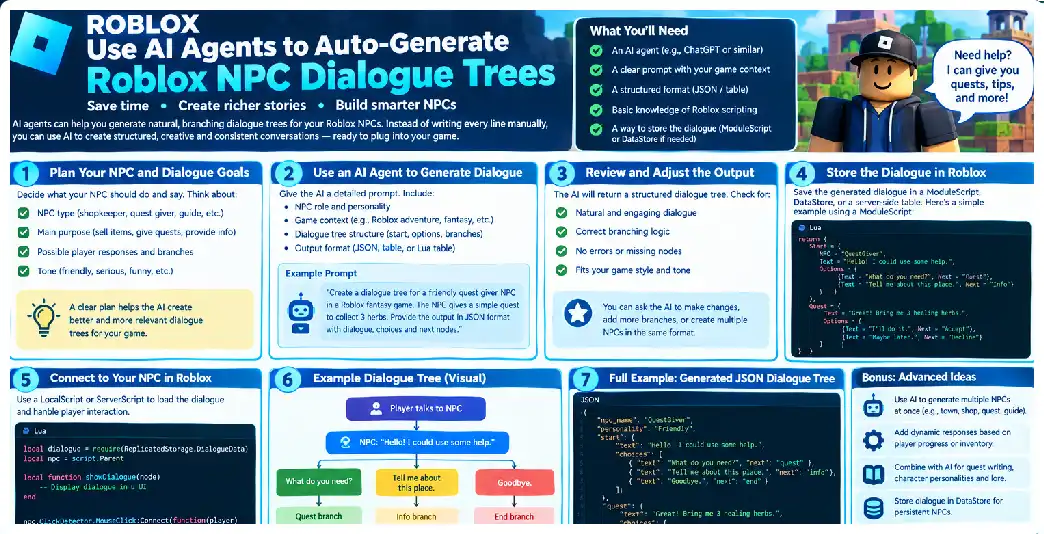
AI agents can dramatically change how Roblox developers create NPC conversations. Instead of manually writing every branch, assigning every node ID, connecting every response, and repeatedly editing dialogue as quests change, you can create a pipeline in which AI agents generate structured conversation trees from your game’s design data.
The important word is pipeline. A reliable system should not simply send a prompt such as “make dialogue for my NPC” and copy the answer into Roblox. An automated system needs a specification, structured output, validation, lore retrieval, logic checks, approval, export, and a runtime capable of interpreting the generated data. Modern agent systems support instructions, tools, structured outputs, guardrails, and multiple-agent orchestration, making this architecture practical for larger content-generation workflows.
Roblox itself provides the runtime capabilities needed to turn the generated tree into an interactive experience. Luau scripts can implement NPC behavior and gameplay systems, ProximityPrompt can initiate interactions, RemoteEvents can carry client-server requests, and server-side code can verify gameplay actions.
The Problem With Manually Written NPC Dialogue
Imagine a game containing:
50 NPCs
10 dialogue nodes per NPC
3 choices per node
5 quest states
3 relationship levels
The number of possible combinations becomes enormous.
A single NPC might have:
First meeting
Returning visit
Quest available
Quest active
Quest completed
Quest failed
High reputation
Low reputation
Special item
Secret branch
Writing all of these manually is possible, but maintaining them becomes increasingly difficult.
If the quest changes from “collect five herbs” to “collect eight herbs,” the dialogue, conditions, and reward descriptions may all need to change.
An AI generation pipeline can regenerate affected dialogue from the updated quest specification rather than requiring a developer to manually locate every related line.
The Key Design Principle
The AI should generate data, not execute the game.
Use:
AI
 ↓
Dialogue JSON
 ↓
Validation
 ↓
Luau Runtime
Avoid:
AI
 ↓
Generate arbitrary Lua
 ↓
Execute Lua
This distinction is fundamental.
The AI can decide that a conversation should contain an action such as start_quest, but the actual implementation of start_quest should be written and controlled by your game code.
Why Structured Outputs Matter
Free-form AI responses are difficult for software to consume reliably.
For example:
Mara says hello.
The player can ask about the village or offer help.
If the player has enough iron, Mara gives them a quest.
A human can understand that.
A computer needs something like:
{
  "nodes": [
    {
      "id": "greeting",
      "text": "Hello.",
      "choices": [
        {
          "id": "ask_village",
          "text": "Tell me about the village.",
          "next": "village"
        }
      ]
    }
  ]
}
Structured outputs allow an agent to target a defined data structure, which makes the result easier to validate and use programmatically.
Build the Dialogue Schema First
Before building the AI agent, design your schema.
A useful schema can contain:
DialogueTree
 ├── npcId
 ├── version
 ├── startNode
 └── nodes[]
       ├── id
       ├── speaker
       ├── text
       ├── conditions[]
       ├── choices[]
       │     ├── id
       │     ├── text
       │     ├── conditions[]
       │     ├── actions[]
       │     └── nextNode
       └── tags[]
This gives the AI a clear target.
Example Schema
{
  "npcId": "captain_aria",
  "version": 1,
  "startNode": "greeting",
  "nodes": [
    {
      "id": "greeting",
      "speaker": "npc",
      "text": "State your business.",
      "choices": [
        {
          "id": "ask_mission",
          "text": "I heard you have a mission.",
          "nextNode": "mission"
        },
        {
          "id": "leave",
          "text": "Nothing. Goodbye.",
          "nextNode": null
        }
      ]
    }
  ]
}
The schema becomes the contract between your AI system and your Roblox runtime.
Build a World Knowledge Base
The dialogue agent should not invent your game world.
Create structured game information:
Characters
Locations
Items
Quests
Factions
Enemies
Historical events
Important objects
World rules
For example:
{
  "locations": [
    {
      "id": "north_village",
      "name": "North Village",
      "description": "A fortified settlement surrounded by forest."
    }
  ]
}
The AI can use this information while generating dialogue.
Agent tools can provide controlled access to external information or application functions.
Build an NPC Database
Each NPC should have a machine-readable profile.
{
  "id": "captain_aria",
  "name": "Captain Aria",
  "role": "village_guard",
  "personality": [
    "disciplined",
    "protective",
    "suspicious"
  ],
  "speechStyle": {
    "sentenceLength": "short",
    "formality": "medium",
    "humor": "low"
  },
  "knowledge": [
    "north_village",
    "village_guard",
    "forest_bandits"
  ]
}
This information can be injected into the agent or retrieved through tools.
Create a Dialogue Generator Agent
The first agent should specialize in generation.
Its instructions might conceptually say:
You are a professional game dialogue designer.

Generate a branching conversation for the supplied NPC.

Follow the supplied:
- personality
- world lore
- quest data
- player-state rules
- dialogue schema

Never invent unsupported:
- quests
- items
- locations
- characters
- actions

Every destination must reference an existing node.

Keep dialogue concise and suitable for an in-game UI.
The agent can then return a structured dialogue object.
Agent configurations support instructions, tools, output types, guardrails, and related runtime controls.
Create a Lore Retrieval Tool
Rather than placing your entire game encyclopedia into every prompt, create tools.
For example:
def get_location(location_id: str):
    """Return the approved location description."""
    ...

def get_character(character_id: str):
    """Return approved character information."""
    ...

def get_quest(quest_id: str):
    """Return the approved quest definition."""
    ...
Function tools can expose controlled application functions to an agent, with input schemas generated or explicitly defined.
This makes your agent more flexible as the game grows.
Create a Quest Tool
Suppose the NPC is a quest giver.
The agent should be able to retrieve:
{
  "id": "repair_gate",
  "objective": "Collect 5 IronOre",
  "reward": {
    "coins": 150
  },
  "nextQuest": "meet_guard"
}
The AI can then write dialogue that reflects the real quest rather than inventing an unrelated objective.
Create an Item Tool
The same principle applies to items.
Instead of asking the AI to guess item names, provide:
IronOre
WoodPlank
HealingPotion
GuardBadge
AncientKey
If the agent wants to mention an item, it should retrieve an approved item definition.
This dramatically reduces hallucinated game objects.
Create a Dialogue Memory System
The generator should know what conversations already exist.
For example:
get_existing_dialogue("captain_aria")
could return:
Captain Aria already discusses:
- village defense
- bandit attacks
- gate repair
The new agent can avoid repeating the same information.
This also helps when expanding an NPC’s dialogue tree.
Build a Multi-Agent Workflow
A production workflow can use:
Agent 1
NPC Planner

Agent 2
Dialogue Generator

Agent 3
Lore Validator

Agent 4
Logic Validator

Agent 5
Dialogue Critic

Agent 6
Exporter
Multi-agent orchestration can be performed through explicit application code, chained agent calls, handoffs, or agents exposed as tools.
NPC Planner Agent
The planner decides:
Conversation purpose
Main conflict
Available topics
Player choices
Possible outcomes
Required game-state conditions
It should not write final dialogue yet.
Example output:
{
  "purpose": "Introduce the village gate quest",
  "topics": [
    "recent attack",
    "damaged gate",
    "iron shortage"
  ],
  "branches": [
    "accept quest",
    "ask about attack",
    "decline"
  ]
}
Dialogue Generator Agent
The generator turns the plan into actual dialogue.
Planner output
     |
     v
Dialogue Generator
     |
     v
Structured dialogue
Separating planning from wording can help prevent the model from simultaneously inventing plot structure and dialogue.
Lore Validator Agent
The lore validator checks:
Does every location exist?
Does every character exist?
Does every item exist?
Does the NPC know the information?
Does the timeline make sense?
If the dialogue says:
“The western kingdom fell last year.”
but your world database says the western kingdom is still active, the validator should reject it.
Logic Validator
The logic validator checks the graph.
Every node reachable?
Every destination valid?
Any broken links?
Any missing exit?
Any impossible condition?
A deterministic validator should perform as much of this work as possible.
Dialogue Critic
The critic focuses on writing quality:
Does the NPC sound consistent?
Are choices meaningful?
Is the conversation repetitive?
Is the player given useful information?
Does the dialogue advance the quest?
Are responses too long?
Agent orchestration supports evaluator patterns in which one agent produces output and another evaluates it, with iteration when necessary.
Use Deterministic Validation Wherever Possible
This is one of the most important engineering principles.
Do not use an AI model for:
Does node X exist?
Is this JSON valid?
Is this field a string?
Is this choice destination valid?
Use code.
Use AI for:
Does this sound like the character?
Is the conversation engaging?
Is the response emotionally appropriate?
Could the branch be more natural?
This division makes the system more reliable.
Building the Validation Pipeline
A generated tree can pass through:
Schema validation
       ↓
Graph validation
       ↓
Entity validation
       ↓
Quest validation
       ↓
Action validation
       ↓
Style validation
       ↓
Human review
Only after all required stages pass should it be exported.
Graph Validation
Consider:
A → B
B → C
C → D
If the AI accidentally creates:
A → B
B → Z
where Z doesn’t exist, the runtime would fail.
Your validator should catch this before the dialogue enters Roblox.
def validate_destinations(tree):
    node_ids = {node.id for node in tree.nodes}

    for node in tree.nodes:
        for choice in node.choices:
            if choice.next_node is None:
                continue

            if choice.next_node not in node_ids:
                raise ValueError(
                    f"Unknown destination: {choice.next_node}"
                )
Checking Reachability
Use graph traversal to find nodes that can never be reached.
def find_unreachable(tree):
    lookup = {node.id: node for node in tree.nodes}
    visited = set()
    stack = [tree.start_node]

    while stack:
        node_id = stack.pop()

        if node_id in visited:
            continue

        visited.add(node_id)

        for choice in lookup[node_id].choices:
            if choice.next_node:
                stack.append(choice.next_node)

    return {
        node.id for node in tree.nodes
        if node.id not in visited
    }
This gives you a deterministic answer.
Checking Choice Counts
You can enforce:
Minimum choices: 1
Maximum choices: 4
For example:
for node in tree.nodes:
    if len(node.choices) > 4:
        raise ValueError(
            f"Too many choices in {node.id}"
        )
This prevents AI from generating huge menus that are difficult to navigate.
Checking Dialogue Length
If your UI displays one NPC response at a time, you may want a maximum character count.
MAX_LENGTH = 240

for node in tree.nodes:
    if len(node.text) > MAX_LENGTH:
        raise ValueError(
            f"Dialogue too long: {node.id}"
        )
You can then send the failed node back to the generator for revision.
Automatic Repair
A useful agent loop is:
Generate
   ↓
Validate
   ↓
Fail?
   ├── No → Approve
   |
   └── Yes
        ↓
      Repair
        ↓
      Validate
For example:
Validator:
Node "quest_reward" references missing item "GoldenHammer".

Repair Agent:
Replace with approved item "IronHammer".

Validator:
PASS.
The repair agent should receive the validation error and the original structured object rather than being asked to regenerate everything from scratch.
Version Control
Every generated dialogue should have:
{
  "npcId": "captain_aria",
  "version": 7,
  "generatedAt": "...",
  "generatorVersion": "dialogue-agent-3",
  "schemaVersion": 2
}
This makes content changes traceable.
Prompt Versioning
Your AI instructions should also be versioned.
For example:
dialogue-generator-v1
dialogue-generator-v2
dialogue-generator-v3
If the generated dialogue suddenly changes style after a prompt modification, you can identify which generator version produced it.
Regenerating Only One Branch
You do not necessarily need to regenerate the entire tree.
Suppose:
greeting
 |
 +-- quest
 |
 +-- lore
 |
 +-- goodbye
Only the lore branch is weak.
Your pipeline can regenerate:
lore
while preserving:
greeting
quest
goodbye
This is another benefit of structured dialogue data.
Dialogue IDs Should Be Stable
Use stable identifiers such as:
captain_aria.greeting
captain_aria.quest_intro
captain_aria.quest_accept
captain_aria.quest_complete
rather than relying on array positions.
Avoid:
Node 1
Node 2
Node 3
because adding a new node can shift every subsequent number.
Using Dialogue Tags
Add tags:
{
  "tags": [
    "quest",
    "main_story",
    "guard",
    "serious"
  ]
}
Tags can help your pipeline search and modify dialogue later.
Integrating With Roblox
Once dialogue is approved, export it to your Roblox project.
A ModuleScript can contain:
return {
    Id = "captain_aria",

    StartNode = "greeting",

    Nodes = {
        greeting = {
            Text = "State your business.",

            Choices = {
                {
                    Id = "mission",
                    Text = "I heard you have a mission.",
                    NextNode = "mission",
                },

                {
                    Id = "leave",
                    Text = "Nothing. Goodbye.",
                    NextNode = nil,
                },
            },
        },
    },
}
Roblox uses Luau for scripting, including dynamic game behavior and NPC systems.
NPC Interaction
A ProximityPrompt can be placed on the NPC.
NPC
 ├── Humanoid
 ├── HumanoidRootPart
 └── TalkPrompt
The prompt can identify the dialogue tree:
DialogueId = "captain_aria"
ProximityPrompt supports interaction across keyboard, gamepad, and touchscreen contexts and provides prompt-triggered events.
Central Dialogue Manager
Create one dialogue manager:
local DialogueManager = {}

function DialogueManager.Start(player, npcId)
    -- Find approved dialogue tree
    -- Verify NPC
    -- Create conversation state
end

function DialogueManager.SelectChoice(player, choiceId)
    -- Validate current node
    -- Validate choice
    -- Evaluate conditions
    -- Execute approved actions
    -- Move to next node
end

return DialogueManager
This keeps dialogue logic out of individual NPC scripts.
Server Authority
The client should display the conversation but should not be trusted to determine whether a reward can be granted.
RemoteEvents provide client-server communication, and server-side verification is important when actions affect game state.
A safe sequence is:
Client
  |
  | choice = "accept_quest"
  v
Server
  |
  +-- Conversation active?
  +-- Choice exists?
  +-- Conditions satisfied?
  +-- Quest available?
  |
  v
Execute action
  |
  v
Send next dialogue to client
Action Registry
Use predefined actions:
local Actions = {
    StartQuest = function(player, data)
        -- trusted quest system
    end,

    GiveItem = function(player, data)
        -- trusted inventory system
    end,

    SetFlag = function(player, data)
        -- trusted world state
    end,
}

return Actions
The generated dialogue can reference only these known actions.
Conditions Registry
Likewise:
local Conditions = {
    HasItem = function(player, data)
        -- inventory check
    end,

    QuestState = function(player, data)
        -- quest check
    end,

    HasFlag = function(player, data)
        -- world-state check
    end,
}

return Conditions
This creates a safe bridge between AI-generated intent and trusted gameplay code.
Do Not Let the AI Write Reward Logic
Suppose the AI generates:
{
  "action": {
    "type": "give_item",
    "item": "LegendarySword",
    "amount": 999
  }
}
Your server should validate:
Is LegendarySword a valid item?
Is this reward allowed?
Is the player eligible?
Is the amount within the quest definition?
The AI should never be the final authority.
Dynamic NPC Conversations
You can make conversations react to player state.
For example:
Relationship < 20
    → suspicious dialogue

Relationship 20–70
    → normal dialogue

Relationship > 70
    → friendly dialogue
The AI can generate each branch while your runtime chooses which branch is active.
Quest State Integration
Use states such as:
NotStarted
Active
Completed
Failed
Then:
{
  "conditions": [
    {
      "type": "quest_state",
      "questId": "repair_gate",
      "equals": "Active"
    }
  ]
}
The server evaluates this state.
Relationship Systems
You can also create:
relationship:
  -30 hostile
  -10 unfriendly
   0 neutral
  20 friendly
  50 trusted
The AI can write different dialogue for each range.
This creates the illusion of persistent NPC relationships without requiring the AI to make real-time gameplay decisions.
World Events
Dialogue can respond to world events:
dragon_attack_started
festival_active
village_gate_repaired
king_dead
forest_burning
The dialogue generator can produce branches for these states.
For example:
{
  "condition": {
    "type": "world_flag",
    "flag": "festival_active",
    "equals": true
  }
}
Time-Based Dialogue
You can also define:
Morning
Afternoon
Evening
Night
The game selects the appropriate branch.
The AI can generate variants:
Morning:
"You're up early."

Night:
"Shouldn't you be sleeping?"
The runtime remains deterministic.
AI-Generated Ambient Dialogue
Not every conversation needs a complex tree.
You can have a separate category:
ambient_lines
The AI can generate dozens of short lines for:
Idle
Rain
Night
Festival
Combat nearby
Player approaches
Quest completed
The game chooses from approved lines.
Preventing Repetition
Your dialogue system can store recent lines:
recentLines[player][npcId]
and avoid immediately repeating them.
The AI can also generate a pool:
10 greetings
10 idle comments
10 farewell lines
This provides variety without requiring real-time generation.
Why Real-Time AI Generation Is Often Unnecessary
You might imagine:
Player talks to NPC
       |
       v
AI API call
       |
       v
Generate dialogue
       |
       v
Display
This introduces network latency, service dependencies, cost, moderation concerns, and unpredictable output.
For most fixed NPC story content, pre-generation is simpler:
Generate before release
        |
        v
Validate
        |
        v
Store
        |
        v
Run locally in game
Real-time AI can still be useful for carefully designed systems, but it should be treated as a separate architecture.
External Generation Pipeline
A powerful workflow is:
Game Designer
      |
      v
NPC YAML/JSON
      |
      v
AI Generation Service
      |
      v
Validation
      |
      v
Review Dashboard
      |
      v
Approved JSON
      |
      v
Luau Export
      |
      v
Roblox
An external backend can interact with supported Roblox cloud APIs where appropriate. Open Cloud provides REST APIs for external tools and applications.
Open Cloud Security
If your pipeline uses Open Cloud to automate deployment or other Roblox resources, keep credentials server-side and use appropriately restricted API keys. Open Cloud API keys support granular permissions, and supported scopes can restrict access to selected resources.
Do not place a privileged Open Cloud key in:
Roblox LocalScripts
Browser JavaScript
Public Git repositories
Dialogue files distributed to players
Human Approval Dashboard
A useful internal tool could display:
NPC: Captain Aria

Generated Dialogue
------------------
[View Tree]

Validation
------------------
Schema: PASS
Lore: PASS
Logic: PASS
Style: PASS

Reviewer
------------------
[Approve]
[Request Changes]
[Reject]
This gives designers control without requiring them to manually inspect raw JSON.
Automated Feedback
When a reviewer rejects dialogue, record why:
Too formal
Wrong personality
Quest information incorrect
Too repetitive
Choice is not meaningful
Too long
The next generation can receive this feedback.
Building a Continuous Content Pipeline
You can eventually automate:
New Quest Created
       |
       v
AI generates quest dialogue
       |
       v
AI generates NPC reactions
       |
       v
Validation
       |
       v
Review
       |
       v
Export
This means dialogue becomes a generated artifact of game design data.
Use Quest Data as the Source of Truth
Instead of separately maintaining:
Quest document
Dialogue document
NPC document
make the quest definition authoritative.
For example:
{
  "questId": "repair_gate",
  "giver": "captain_aria",
  "requirements": [
    {
      "item": "IronOre",
      "amount": 5
    }
  ],
  "reward": {
    "coins": 150
  }
}
The dialogue agent reads this data.
When the quest changes, dialogue can be regenerated.
Testing Before Release
Your automated test suite should simulate:
Player has no items
Player has partial items
Player has all items
Quest inactive
Quest active
Quest complete
Player too far away
Invalid choice
Repeated choice
Expired conversation
NPC unavailable
The dialogue system should handle each scenario predictably.
Performance Considerations
Do not make the client request large dialogue trees unnecessarily.
Load the relevant NPC tree when needed or keep approved dialogue data organized efficiently.
The conversation UI should only need the current node and relevant choices in many designs.
Mobile and Console Support
Roblox experiences run across different input methods, so your dialogue interface should not depend exclusively on keyboard interaction.
ProximityPrompt supports keyboard, gamepad, and touchscreen input, making it useful for initiating NPC conversations across supported input types.
Your custom dialogue UI should similarly support:
Mouse
Keyboard
Gamepad
Touch
Localization
For international audiences, store dialogue separately from UI structure.
For example:
{
  "id": "captain_aria.greeting",
  "localizationKey": "dialogue.captain_aria.greeting"
}
Then the same node can resolve to different language strings.
TextChatService provides in-experience text-chat functionality and localization-related capabilities, although NPC dialogue UI may use its own interface depending on your game’s design.
UK, USA, and Canada Compatibility
The architecture works for Roblox developers and players in the UK, United States, and Canada because the underlying Luau, ProximityPrompt, RemoteEvent, and external-agent architecture is not fundamentally country-specific.
The content layer can nevertheless be adapted for regional spelling and terminology. For example, a dialogue generator can be instructed to use specific vocabulary or spelling conventions when producing localized English variants.
Frequently Asked Questions
What is the best way to use AI for Roblox NPC dialogue?
Use AI as a structured content generator rather than allowing it to execute arbitrary game code. Generate JSON containing nodes, choices, conditions, and actions, validate it, then let trusted Luau code execute it.
Can one agent generate the complete tree?
Yes, but multiple specialized agents can provide better separation between generation, lore checking, logic checking, and critique. Agent orchestration supports chaining and evaluator patterns.
What should the AI output?
A structured object containing:
NPC ID
Start node
Nodes
Dialogue text
Choices
Conditions
Actions
Destinations
Should dialogue nodes have unique IDs?
Yes. Stable unique IDs make validation, versioning, branching, and future modifications much easier.
Can AI generate quest dialogue automatically?
Yes. Feed the agent structured quest information and instruct it to generate dialogue that conforms to that quest.
Can AI generate different responses based on player reputation?
Yes. Represent reputation conditions as structured data and let the Roblox server evaluate them.
Can AI give players items?
The AI can request a predefined give_item action, but the trusted Roblox server should validate and execute the actual reward.
Can AI generate arbitrary Lua?
It can produce Lua text, but using structured data plus trusted runtime functions is generally a safer architecture.
Can I use multiple AI agents?
Yes. A generator, lore validator, logic validator, and critic can be chained into one content pipeline.
Can an AI agent access my game database?
It can be given controlled tools that retrieve approved information. Function tools allow applications to expose selected functions to agents.
Can I automatically export the result to Roblox?
Yes. An external build pipeline can generate the dialogue artifact and, where appropriate, use supported cloud APIs for Roblox resource workflows.
Can NPC dialogue change after the player completes a quest?
Yes. Store quest state and select the appropriate dialogue branch based on server-side state.
Can the AI generate thousands of dialogue trees?
Yes. Batch generation can be automated, provided the pipeline includes validation, retry handling, versioning, and review.
Can dialogue be generated in multiple languages?
Yes. It is better to separate dialogue node identity from localized text so that the same game logic can use multiple language versions.
Can AI create believable NPC personalities?
It can generate personality-consistent drafts when given explicit character information, voice rules, knowledge boundaries, and examples. A validation or review stage is still useful.
Final Architecture
A strong automated system ultimately looks like this:
                 GAME DESIGN DATA
                       |
        ┌──────────────┼──────────────┐
        |              |              |
      NPCs           Quests          Lore
        |              |              |
        └──────────────┼──────────────┘
                       |
                       v
               PLANNER AGENT
                       |
                       v
             DIALOGUE AGENT
                       |
                       v
             STRUCTURED JSON
                       |
          ┌────────────┼────────────┐
          |            |            |
       Schema        Lore         Logic
       Check        Check        Check
          |            |            |
          └────────────┼────────────┘
                       |
                       v
                 CRITIC AGENT
                       |
                       v
                 HUMAN REVIEW
                       |
                       v
                 LUau EXPORT
                       |
                       v
              ROBLOX DIALOGUE
                       |
                       v
                    PLAYER
The greatest advantage of this architecture is that it separates creative intelligence from game authority.
The AI is responsible for generating possibilities. Your validators determine whether those possibilities are structurally valid. Your game database determines whether the referenced entities exist. Your Roblox server determines whether gameplay conditions are satisfied. Your Luau action registry determines what the game can actually do.
That division allows you to use AI aggressively for content production without making the AI the authority over your game.
The result can be a scalable NPC dialogue factory capable of generating hundreds or thousands of conversations while preserving character personality, quest consistency, world lore, branching structure, and gameplay safety. Modern agent frameworks provide the building blocks for this kind of workflow through structured outputs, tools, guardrails, and multi-agent orchestration.