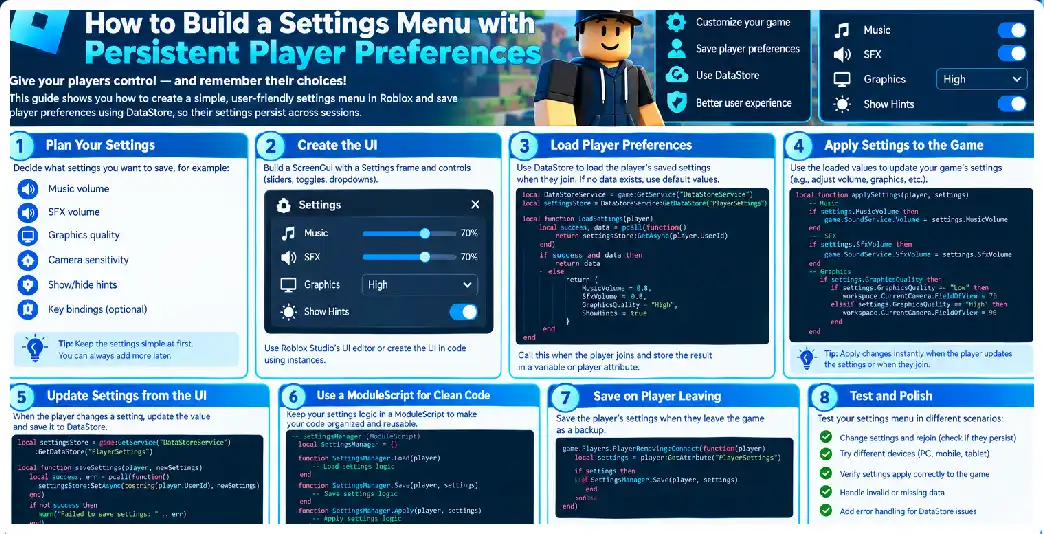
A production-quality Roblox settings system should be designed as a small data-management system rather than simply a collection of buttons. The visible menu is only one part of the architecture. Behind it are default values, player-specific state, validation, persistence, migration, synchronization, error handling, throttling, and platform-aware user interface behavior. Persistent settings need to survive player sessions while remaining safe when clients disconnect, servers shut down, requests fail, or the game evolves over time.
The strongest architecture separates four responsibilities: presentation, local application, server authority, and persistence. The interface should display settings and collect input. Client-side controllers should apply appropriate local effects. The server should validate and maintain authoritative player preference state. Finally, a persistence layer should load and save the server’s state. This separation reduces coupling and follows the broader client-server model used by multiplayer experiences.
Design the Data Contract First
Before building the interface, define exactly what a setting is.
For example:
local DEFAULT_SETTINGS = {
    SchemaVersion = 1,

    Audio = {
        Music = 1,
        Effects = 1,
        Voice = 1,
    },

    Gameplay = {
        ScreenShake = true,
        Subtitles = true,
        Tutorials = true,
    },

    Controls = {
        Sensitivity = 1,
    },
}
This is more maintainable than putting every setting at the top level because categories can grow without turning the entire record into an unstructured collection of values.
Persistent data should contain durable player preferences rather than temporary interface information. Whether the settings panel is open, whether a slider is currently being dragged, or which tab is selected normally belongs to transient UI state rather than the persistent record.
A persistent record can be associated with a stable player identifier. Static key patterns based on UserId are preferable to names that may change. Current storage guidance also recommends using a small, fixed collection of data stores and organizing player information by keys.
Use a Schema Version
Adding a schema version is one of the easiest improvements you can make to a persistent settings system.
{
    SchemaVersion = 3,

    Settings = {
        ...
    }
}
Imagine version one contains only music and effects. Version two adds subtitles. Version three adds reduced visual effects.
When an existing player joins, the loader can detect the older version and upgrade it.
Conceptually:
Version 1
   ↓
Add subtitles
   ↓
Version 2
   ↓
Add reduced effects
   ↓
Version 3
This is safer than assuming every stored record has the latest fields.
Keep Defaults Separate From Player Data
Defaults should be defined in code rather than copied blindly into every save operation.
local DEFAULTS = {
    Music = 1,
    Effects = 1,
    Subtitles = true,
}
When loading data, create a new settings table based on the defaults and then overwrite only fields that exist in the player’s saved record.
This prevents missing fields from becoming nil when a new game version introduces additional preferences.
It also gives designers one central place to change the default experience for new players.
Build a Settings Manager
Instead of allowing every server script to manipulate the player’s data directly, create a settings manager.
Its responsibilities can include:
Load(player)
Get(player, setting)
Set(player, setting, value)
GetAll(player)
Reset(player)
Save(player)
Release(player)
The rest of the game then interacts with a controlled API.
For example:
SettingsManager:Set(player, "Subtitles", false)
rather than directly changing:
playerSettings[player.UserId].Subtitles = false
This abstraction becomes particularly useful when the game becomes larger.
Keep a Server-Side Cache
A persistent store should not be treated as a live database that you query every time a player changes a checkbox. Current guidance recommends loading player data into server memory and modifying the local copy during the session, then saving at appropriate intervals and lifecycle events.
A simplified cache might be:
local sessionData = {}

sessionData[player.UserId] = {
    Music = 0.75,
    Effects = 1,
    Subtitles = true,
}
The player’s settings menu interacts with this session object indirectly through server APIs.
The data store becomes the durable source of persistence, while the session cache becomes the active source for the current server session.
Create a Controlled Remote API
Place RemoteEvents somewhere accessible to both client and server, such as ReplicatedStorage. RemoteEvents support asynchronous one-way communication between clients and servers.
A production architecture might use:
ReplicatedStorage
└── SettingsRemotes
    ├── RequestChange
    ├── RequestReset
    └── StateUpdate
The client might send:
RequestChange:FireServer(
    "Audio",
    "Music",
    0.65
)
The server validates all three pieces.
This is considerably safer than giving the client a generic mechanism that can modify arbitrary server properties.
Whitelist Every Setting
The server should know which settings are legal.
local SETTINGS_RULES = {
    Audio = {
        Music = {
            Type = "number",
            Min = 0,
            Max = 1,
        },

        Effects = {
            Type = "number",
            Min = 0,
            Max = 1,
        },
    },

    Gameplay = {
        Subtitles = {
            Type = "boolean",
        },

        ScreenShake = {
            Type = "boolean",
        },
    },
}
When a client submits a request, the server looks up the setting and validates its type and range.
This prevents requests such as:
UnknownSetting = "GiveMeAdmin"
or:
Music = 999999
from entering the persistent state.
Client-server communication should always be designed with the assumption that the client can send unexpected input. The server remains the authoritative side for validating multiplayer state.
Avoid RemoteFunction for Long Operations
Settings systems rarely need a synchronous request-response operation. RemoteEvents are generally a better fit for asynchronous updates.
A RemoteFunction causes the caller to yield while waiting for the response, while RemoteEvents provide asynchronous communication. Long-running or unreliable operations therefore should not unnecessarily block UI code through synchronous remote calls.
For example:
Client
  ↓
RequestChange
  ↓
Server validates
  ↓
Server updates state
  ↓
StateUpdate
  ↓
Client refreshes UI
This pattern is simple and resilient.
Do Not Trust the Client’s Local State
Suppose the UI says:
Music Volume: 70%
That does not necessarily mean the server currently stores 0.70.
The client can immediately preview the change locally, but the server should receive the request and validate it.
For settings that have no gameplay consequences, this may seem overly cautious. However, establishing a consistent architecture is beneficial because the same system may later contain settings that influence gameplay or accessibility behavior.
Separate Presentation From Application
The settings UI should not contain every system-specific implementation.
For example:
MusicToggle
     ↓
SettingsClient
     ↓
AudioController
rather than:
MusicToggle
     ↓
500 lines of audio logic
Similarly:
ScreenShakeToggle
     ↓
SettingsClient
     ↓
CameraController
This means the settings menu only communicates the preference.
Build the UI Around Categories
A production menu should normally separate unrelated preferences.
A possible hierarchy is:
SettingsGui
└── MainFrame
    ├── CategoryList
    │   ├── AudioButton
    │   ├── GameplayButton
    │   ├── AccessibilityButton
    │   └── ControlsButton
    │
    └── ContentFrame
Roblox’s UI system provides frames, labels, buttons, input elements, sizing, positioning, layering, and other components for creating such interfaces.
Using separate category panels also makes it easier to support smaller screens because only the relevant controls need to occupy the visible area.
Use Activated for Buttons
Buttons can respond to the Activated event, which is designed for button interaction across supported input methods.
For example:
button.Activated:Connect(function()
    -- Toggle setting
end)
This is generally cleaner than implementing separate mouse and touch handlers for the same basic action.
Build a Reusable Toggle Component
Instead of writing individual toggle logic for every setting, create a reusable function.
local function setToggle(button, enabled)
    button.Text = enabled and "ON" or "OFF"
end
Then:
setToggle(SubtitlesButton, true)
setToggle(ScreenShakeButton, false)
A larger component could also update icons, colours, animation states, accessibility labels, and sounds.
The persistent system does not need to know how the toggle looks.
Handling Sliders Correctly
Volume and sensitivity settings often require continuous values.
For example:
0.00 → 0%
0.25 → 25%
0.50 → 50%
0.75 → 75%
1.00 → 100%
The client can update the preview continuously while the server receives a controlled number of updates.
Do not send hundreds of persistent writes simply because the player dragged a slider from 0% to 100%.
Instead:
Slider movement
      ↓
Local preview
      ↓
Debounce / release
      ↓
Server request
      ↓
Validated session state
      ↓
Later persistent save
This reduces unnecessary requests and keeps the experience responsive. Persistent-storage guidance specifically recommends reducing unnecessary requests and buffering player data in memory.
Saving With UpdateAsync
When saving persistent settings, UpdateAsync() can be appropriate when the current stored value needs to be considered or multiple servers might access the same key. It reads the latest stored value before applying the update.
A simplified save operation:
local success, result = pcall(function()
    return SettingsStore:UpdateAsync(key, function(oldData)
        return {
            SchemaVersion = CURRENT_VERSION,
            Settings = sessionSettings,
        }
    end)
end)
The actual production implementation should carefully consider session ownership, concurrent writes, retries, and whether replacing the entire settings object is appropriate.
Retry Temporary Failures
Data-store operations can fail. Production systems should not assume that every request succeeds on the first attempt. Current guidance recommends pcall() around requests and controlled retries with exponential backoff and jitter for transient failures.
A conceptual retry strategy is:
Attempt 1
   ↓ failure
short delay
   ↓
Attempt 2
   ↓ failure
longer delay
   ↓
Attempt 3
The retry system should have a maximum number of attempts and should not endlessly retry invalid operations.
Prevent Old Writes From Overwriting New Data
Consider this sequence:
Server A saves Version A
Server B saves Version B
Server A retry finally completes
If the retry contains stale data, it could potentially overwrite a newer record. This is one reason persistent-data systems must treat retries and concurrency carefully. Current storage guidance specifically warns that older requests that retry after newer requests succeed can overwrite newer data.
For simple settings this problem may be less visible than for inventories, but the architecture should still be designed correctly.
Saving on Player Removal
When the player leaves, save the current session record.
Players.PlayerRemoving:Connect(function(player)
    SettingsManager:Save(player)
end)
Then remove the session cache after the save process is handled.
Do not remove the in-memory record first and then attempt to save it.
Handling Server Shutdown
Use BindToClose() to handle unsaved data during server shutdown. This is particularly important for players who are still present when the server closes.
A complete production system should coordinate shutdown saves rather than assuming every request will finish instantly.
Settings Replication
Once the server loads preferences, it needs to communicate them to the client.
For a small system, a RemoteEvent can send the complete settings object:
StateUpdate:FireClient(player, settings)
The client can then update every control.
For certain server-owned values associated with instances, attributes can also be useful because Roblox automatically replicates attribute values.
However, persistent player preferences do not need to be converted into attributes just because attributes exist. Choose the mechanism based on the type of state being replicated.
Reset Functionality
A production reset function should reset only settings.
Reset Settings
      ↓
Clone DEFAULTS
      ↓
Replace current session preferences
      ↓
Send new state to client
      ↓
Apply locally
      ↓
Persist later
Never use a settings reset button to call a function that removes the player’s entire data record.
Version Migration
Migration becomes important when the settings system evolves.
Suppose:
Version 1:
Music
Effects

Version 2:
Music
Effects
Subtitles

Version 3:
Music
Effects
Subtitles
ReducedEffects
Your loader can perform:
if version < 2 then
    data.Subtitles = true
end

if version < 3 then
    data.ReducedEffects = false
end
Then update:
data.Version = 3
This gives old players a controlled transition to the new schema.
UK, USA, and Canada Considerations
The core Roblox implementation does not need separate persistence architectures for players in the United Kingdom, United States, or Canada. The same server-side data model can store preferences regardless of the player’s country.
What can differ is the user experience. Text may need localization, spelling may vary between regional English variants, and accessibility expectations can differ among audiences. A good settings system should therefore avoid hard-coding text deep inside logic.
For example, instead of making game logic depend on:
button.Text == "Enabled"
store the actual state as:
true
and let the presentation layer determine the displayed wording.
This also makes translation considerably easier.
Testing Strategy
A production settings system needs more than normal playtesting.
Test:
New player
Verify:
No record
↓
Defaults
↓
Correct UI
Existing player
Verify:
Saved record
↓
Load
↓
UI matches record
Missing field
Verify:
Old record
↓
New default inserted
↓
Other data preserved
Invalid client request
Verify:
Invalid setting
↓
Server rejects
Storage failure
Verify:
Load fails
↓
Safe fallback
↓
No destructive overwrite
Rapid interaction
Test players rapidly clicking toggles and dragging sliders.
Server shutdown
Confirm unsaved changes are handled.
Multiple servers
Test the same account moving between servers.
Data-store testing requires particular care because development environments can access persistent data when configured to do so, and using production records for testing can create accidental overwrites.
Performance
Settings themselves are lightweight. The performance problem usually comes from poor architecture.
Avoid:
Every button click
      ↓
DataStore request
Prefer:
Button click
      ↓
Memory update
      ↓
Occasional persistence
The persistent-storage layer should not become part of the frame-by-frame gameplay loop.
Security
The settings system should treat all client requests as untrusted input.
Validate:
- Setting category
- Setting name
- Data type
- Numeric range
- Allowed values
- Request frequency
- Player ownership
- Server-side state
Never allow a generic client request such as:
SetAnything("SomePath", someValue)
without strict validation.
A specific API is safer:
SetPreference("MusicVolume", 0.75)
because the server knows exactly what it is designed to accept.
Final Recommended Architecture
A production implementation can be visualized as:
                    ┌─────────────────┐
                    │ Persistent Store│
                    └────────┬────────┘
                             │
                          Load/Save
                             │
                    ┌────────▼────────┐
                    │ Settings Manager│
                    │  Server Cache   │
                    └────────┬────────┘
                             │
                    Validation Layer
                             │
                     Remote Events
                             │
              ┌──────────────┴──────────────┐
              │                             │
       Settings Client               Other Systems
              │
       ┌──────┴──────┐
       │             │
      UI       Local Controllers
                   │
          Audio / Camera / UI
This design gives you a settings menu that can survive sessions, support future features, handle data migrations, remain secure against invalid client requests, and scale much better than a simple collection of LocalScripts.
Frequently Asked Questions
Should settings be stored with inventory data?
They can be stored in the same player record when appropriate, particularly when the combined record is manageable and related data benefits from atomic updates. Current guidance recommends organizing player information efficiently rather than creating unnecessary stores.
How often should settings be saved?
There is no universal interval. The important principle is to avoid persistent writes for every UI interaction and maintain an in-memory session copy. Periodic saves, player departure, shutdown, and important checkpoints can be used according to the game’s requirements.
Is DataStoreService suitable for permanent settings?
Yes. Persistent player preferences are an appropriate use for standard data stores because they are intended for data that should survive between sessions.
Can MemoryStoreService replace persistent storage?
No. Memory stores are intended for temporary data and should not be used as the permanent record for player preferences.
Can I have hundreds of settings?
Technically, a data record can contain many values, but a large settings menu can become difficult to maintain and confusing to players. Group settings logically and persist only meaningful preferences.
Should the client apply settings immediately?
For presentation preferences such as audio or visual effects, immediate local application can provide a better user experience. The server can independently validate and persist the preference.
Should I save the settings menu’s open or closed state?
Usually not. Whether a menu is open is temporary UI state rather than a meaningful long-term player preference.
Should I use Attributes?
Attributes can be useful for replicating custom state associated with instances, but they are not a replacement for persistent data stores.
What happens if the player disconnects during a save?
A production system should use controlled save handling and avoid assuming that every write succeeds. Retry logic and careful session-state management are important for persistent data reliability.
Can the system support accessibility settings?
Yes. Settings such as subtitles, reduced effects, screen shake, sensitivity, text presentation, and audio controls can all be represented as persistent preferences.
Is a settings system different for mobile?
The persistence architecture can remain the same, but the interface should be designed and tested for touch interaction and different screen sizes. Roblox’s button system supports activation across multiple input types.
Pretty! This has been an extremely wonderful article.
Many thanks for supplying this information.